App Advertising: How to Advertise Your App With Video Ads
To advertise your app, run install campaigns where your users already are. That means Apple Ads, Google App campaigns, Meta's App promotion and TikTok's App Promotion. Three of the four run on videos you give them.
 App advertising
In short
- Apple Ads builds the ad from your App Store page, its screenshots and app previews, and you pay per tap or per install. New accounts get a 100 USD credit.123
- Google, Meta and TikTok run your videos. Google takes up to 20 per ad group, in 16:9, 9:16 and 1:1. Meta recommends new creative for app campaigns 2 to 4 times a month.456
- The videos are the work. 10xvid makes them from your app's link, drawn from your real screens, and your first ad is free.7
Where can you advertise an app?
In four main places, each with its own idea of what an ad is. The facts are each platform's own, read on 21 October 2026.
| Where | Where the ad shows | What it is built from | How it is bought |
|---|---|---|---|
| Apple Ads | The App Store: search results, the Search tab, the Today tab, product pages1 | "the metadata and assets you already uploaded in App Store Connect"1 | Per tap, or per install on Basic2 |
| Google App campaigns | "Search, Google Play, YouTube, Discover on Google Search, and the Google Display Network"8 | Your text, images and videos, plus your store listing8 | Your budget and a bid goal |
| Meta App promotion | Facebook and Instagram | Your images and videos | Optimised for installs, app events or value9 |
| TikTok App Promotion | TikTok | Your videos | For "App Install and App Retargeting"10 |
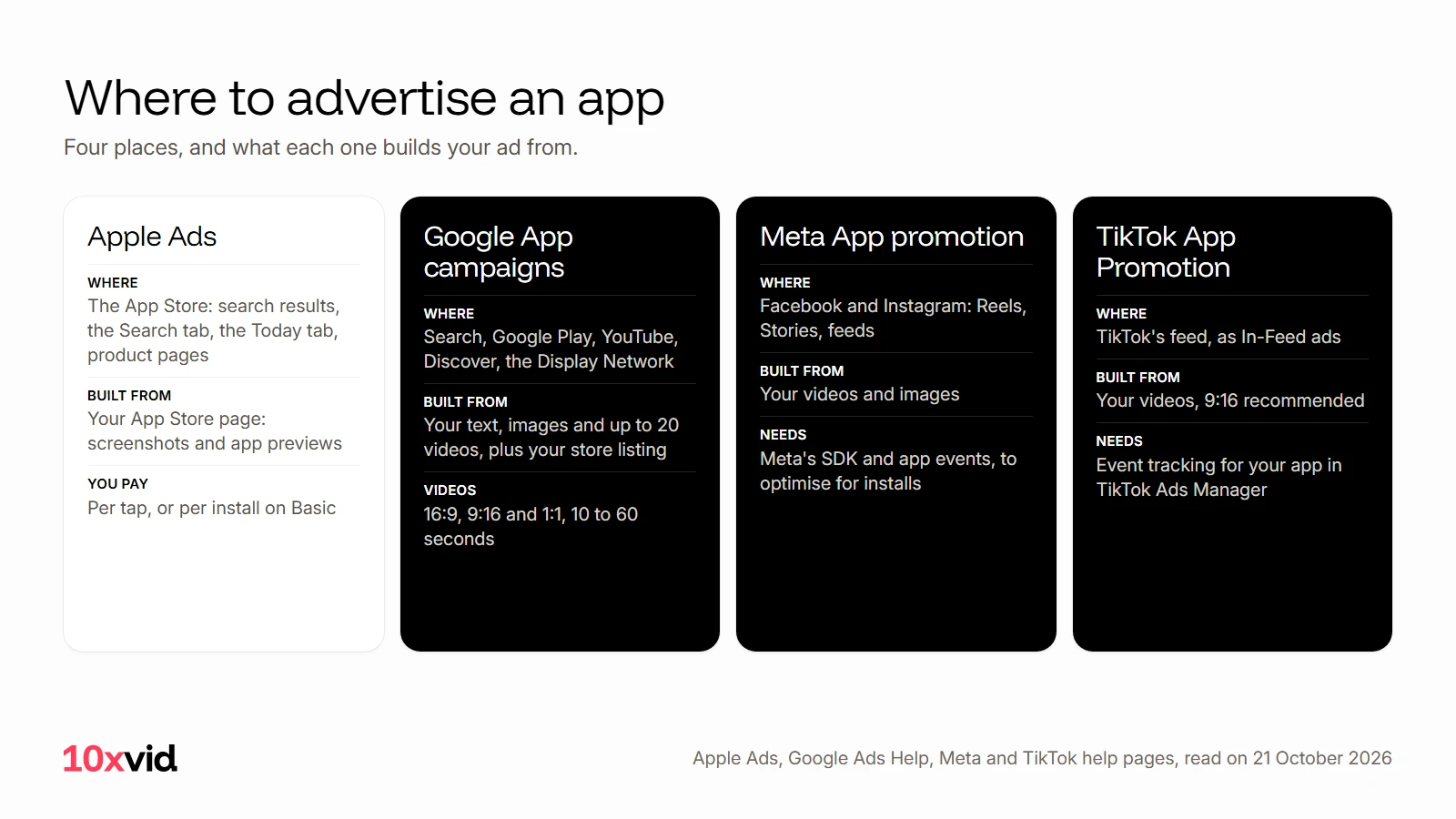
Apple's ads live inside the App Store, where people are already looking for an app. The other three find people who were not looking, in feeds and on YouTube, and that is where a video has to stop them.
What do you need before you advertise?
Tracking, so the platform can learn who installs.
- Meta: you need its SDK and app events to optimise for installs, app events or value. Without a registered app, ads optimise for link clicks instead.9
- TikTok: "set up event tracking for your app on TikTok Ads Manager", for example through its App Event SDK.11
- Apple: nothing extra for the ad itself. It is made from what you already put in App Store Connect.1
And a store page that converts, because every ad ends there. How to promote an app starts with the store page for that reason.
What does Apple Ads show?
Your App Store page. "A default ad is automatically created using screenshots and app previews from your default App Store product page."3 To show different things to different searches, you build custom product pages: "You can build up to 70 custom product pages with different app preview videos, screenshots, promotional text, and deep links."3
So the video in an Apple ad is your app preview. The App Store preview video guide covers Apple's rules for it.
What videos do Google, Meta and TikTok need?
Google App campaigns test combinations of what you give them: "Our system will test different asset combinations using your ad text ideas, images, videos, and assets from your app's store listing." You can add "up to 10 text, 20 image, and 20 video assets per ad group". The videos go up to YouTube first, in 16:9, 9:16 and 1:1, each 10 to 60 seconds.8412 If you upload none, Google "may build one automatically from your App Store or Google Play assets".12
Meta runs your videos in Reels, Stories and the feeds: 9:16 for Reels and Stories, 4:5 or square for the Facebook feed.13 In Advantage+ app campaigns you can add up to 50 images or videos at a time. Meta recommends changing your ad creative 2 to 4 times a month.6 The Facebook video ad maker guide has the shapes in full.
TikTok wants vertical 9:16, and suggests 3 to 5 different creatives per ad group.14 TikTok's ad specs are on their own page.
That adds up to a lot of video: three shapes, several ideas at once, and new ones every week or two.
How do you make those videos?
From what your app already has: its screens, its words, its offer. With 10xvid, paste your App Store link or your website into the chat. It reads the page and writes a blueprint of the ad: who it is for, the story in order, why they act, how it looks. Press Produce, and you get 9:16, 1:1 and 16:9 from one run, 5 to 30 seconds, as 1080p MP4s.7
Every film is read frame by frame and judged at 8 of 10 before you see it. When one tires, change the hook on its blueprint and a new film is made from the same plan.7
Where 10xvid fits
10xvid, motion graphics ads for apps, makes the videos Google, Meta and TikTok run, from your app's link, in every shape they ask for. Motion V1 Flash makes one in about five minutes.7 When an ad tires, creative fatigue explains how the platforms tell you.
The first ad is free, with no card: make your first ad.
Questions about app advertising
How much does it cost to advertise an app?
You set the budget. Apple Ads Basic runs up to 10,000 USD per app a month, Advanced has no maximum, and new accounts start with a 100 USD credit. Google, Meta and TikTok run on a budget and a bid you choose.215
Where should I advertise my app first?
Where your users spend time, and where you can make the creative. Apple Ads needs only your App Store page; the feeds and YouTube need videos in several shapes.
Can I advertise an app for free?
Apple Ads gives new accounts a 100 USD credit.15 Beyond that, the free routes are your store page and your own channels: see how to promote an app.
Do I need an SDK to advertise an app?
For Meta and TikTok, yes, to optimise for installs and in-app events.911 Apple Ads works from your App Store page.1
- Apple Ads help, "Ad placement options" (ads.apple.com/app-store/help/ad-placements/0081-ad-placement-options), read on 21 October 2026. ↩
- Apple Ads help, "Compare Apple Ads solutions" (ads.apple.com/app-store/help/apple-ads-basic/0001-compare-apple-ads-solutions), read on 21 October 2026. ↩
- Apple Ads help, "Create ad variations" (ads.apple.com/app-store/help/ads/0077-create-ad-variations), read on 21 October 2026. ↩
- Google Ads Help, App campaign best practices (support.google.com/google-ads/answer/6167162), read on 21 October 2026. ↩
- Google Ads Help, App campaign video specs (support.google.com/google-ads/answer/17091671), read on 21 October 2026. ↩
- Meta Business Help Center, "Creative Recommendations And Reporting For Advantage+ App Campaigns" (facebook.com/business/help/716015512512235), read on 21 October 2026. ↩
- 10xvid.com/engine, read on 21 October 2026. ↩
- Google Ads Help, "About App campaigns" (support.google.com/google-ads/answer/6247380), read on 21 October 2026. ↩
- Meta Business Help Center, App promotion objective (facebook.com/business/help/2083260191704068), read on 21 October 2026. ↩
- TikTok Ads Manager help, "What is the App Promotion objective" (ads.tiktok.com/resources/help/article/what-is-app-promotion-objective), read on 21 October 2026. ↩
- TikTok Ads Manager help, "How to use App Promotion" and "About the TikTok App Events SDK" (ads.tiktok.com/resources/help), read on 21 October 2026. ↩
- Google Ads Help, App campaign video assets (support.google.com/google-ads/answer/9948381 and 17091671), read on 21 October 2026. ↩
- Meta, Facebook Ads Guide, video ad specs for Reels, Stories and Feed (facebook.com/business/ads-guide), read on 20 October 2026. ↩
- TikTok Ads Manager help, "Creative best practices for performance ads" (ads.tiktok.com/help/article/creative-best-practices), read on 21 October 2026. ↩
- Apple Ads (ads.apple.com/app-store), read on 21 October 2026. ↩