Facebook Video Ad Maker: Reels and Feed Ads From Your App
A Facebook video ad maker turns your product into videos for Meta's placements. That means a vertical 9:16 film for Reels and Stories, and a 4:5 or square one for the Facebook feed. Make each shape for its own frame, and keep your words where Reels does not cover them.
 Facebook video ads
In short
- Shapes: Meta recommends 9:16 for Reels and Stories, and for videos in the Instagram feed. For the Facebook feed it recommends 4:5, and square 1:1 is supported.12
- What Reels covers: Meta suggests keeping text, logos and key elements out of the top 14%, the bottom 35% and 6% at each side. There, the profile icon and the call-to-action would cover them.1
- Sound and captions: "Reels default to sound-on", Meta says, and it calls sound "Optional, but strongly recommended". Captions make the ad readable for the people who watch muted.314
Which shapes does a Facebook video ad need?
Each placement has its own recommended shape. These are Meta's own figures, read on 20 October 2026.12
| Placement | Recommended shape | Also takes | Length |
|---|---|---|---|
| Facebook Reels | 9:16, 1440 by 2560 | No maximum | |
| Instagram Reels | 9:16, 1440 by 2560 | 0 seconds to 15 minutes | |
| Facebook Stories | 9:16, 1440 by 2560 | 1 second to 3 minutes; split into cards after 15 seconds | |
| Facebook Feed | 4:5, 1440 by 1800 | 1:1, 16:9, 1.91:1 | 1 second to 241 minutes |
| Instagram Feed | 9:16 for videos | 1:1, 4:5 | 1 second to 60 minutes |
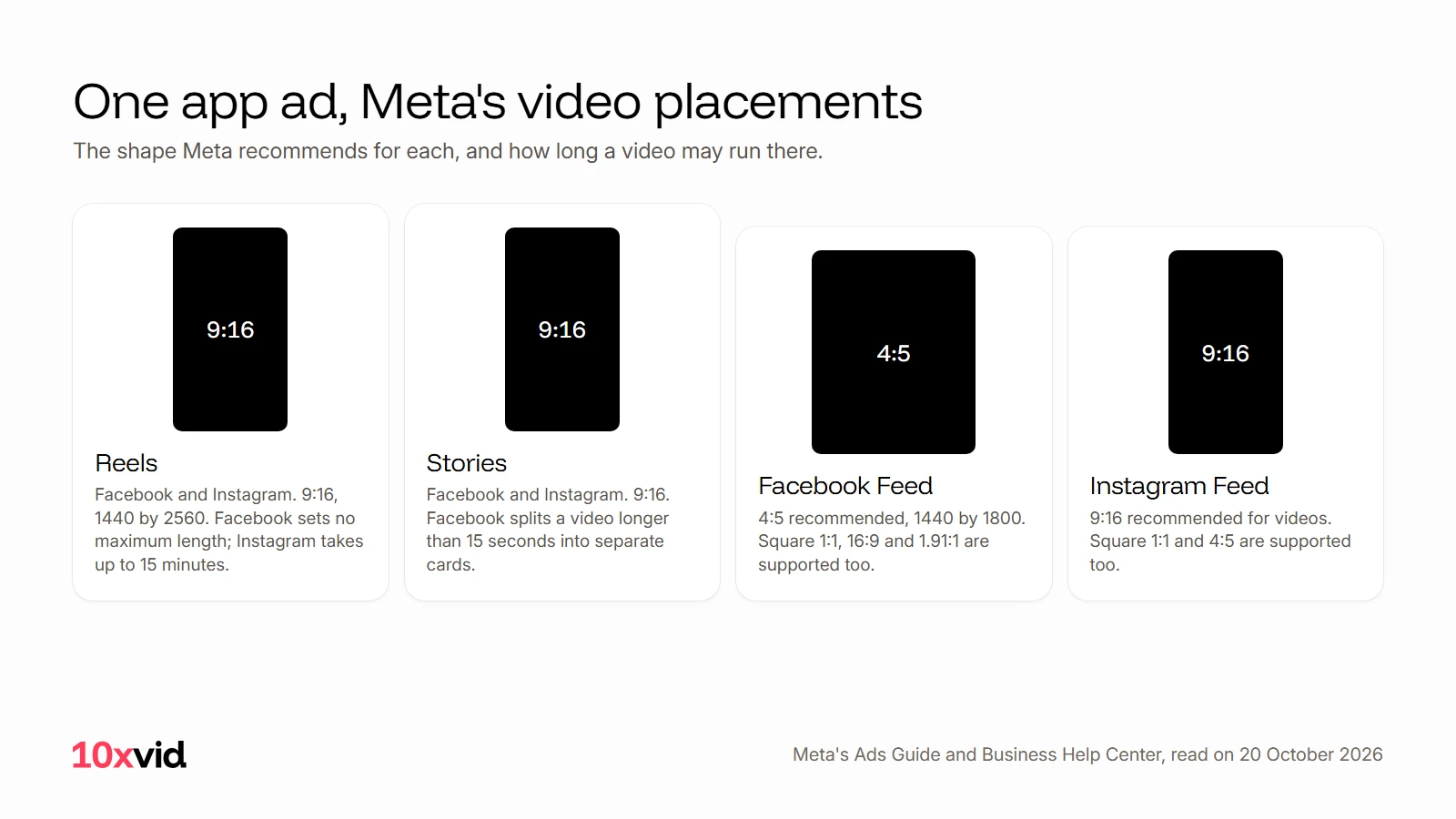
In practice that is two films. One is vertical, for Reels, Stories and the Instagram feed; the other is 4:5 or square, for the Facebook feed. On a computer, Facebook shows feed videos at 1:1.2
You do not need a separate ad for each. Meta's "asset customization for placements" lets one ad carry a different video for each placement group.5
What does Reels cover on your ad?
A Reels ad plays full screen, and Meta lays its own profile icon and call-to-action over it. Meta's advice is to "Consider leaving roughly 14% of the top, 35% of the bottom, and 6% on each side of your asset free from text, logos, or other key creative elements".1 For Instagram Reels it says "at least".1
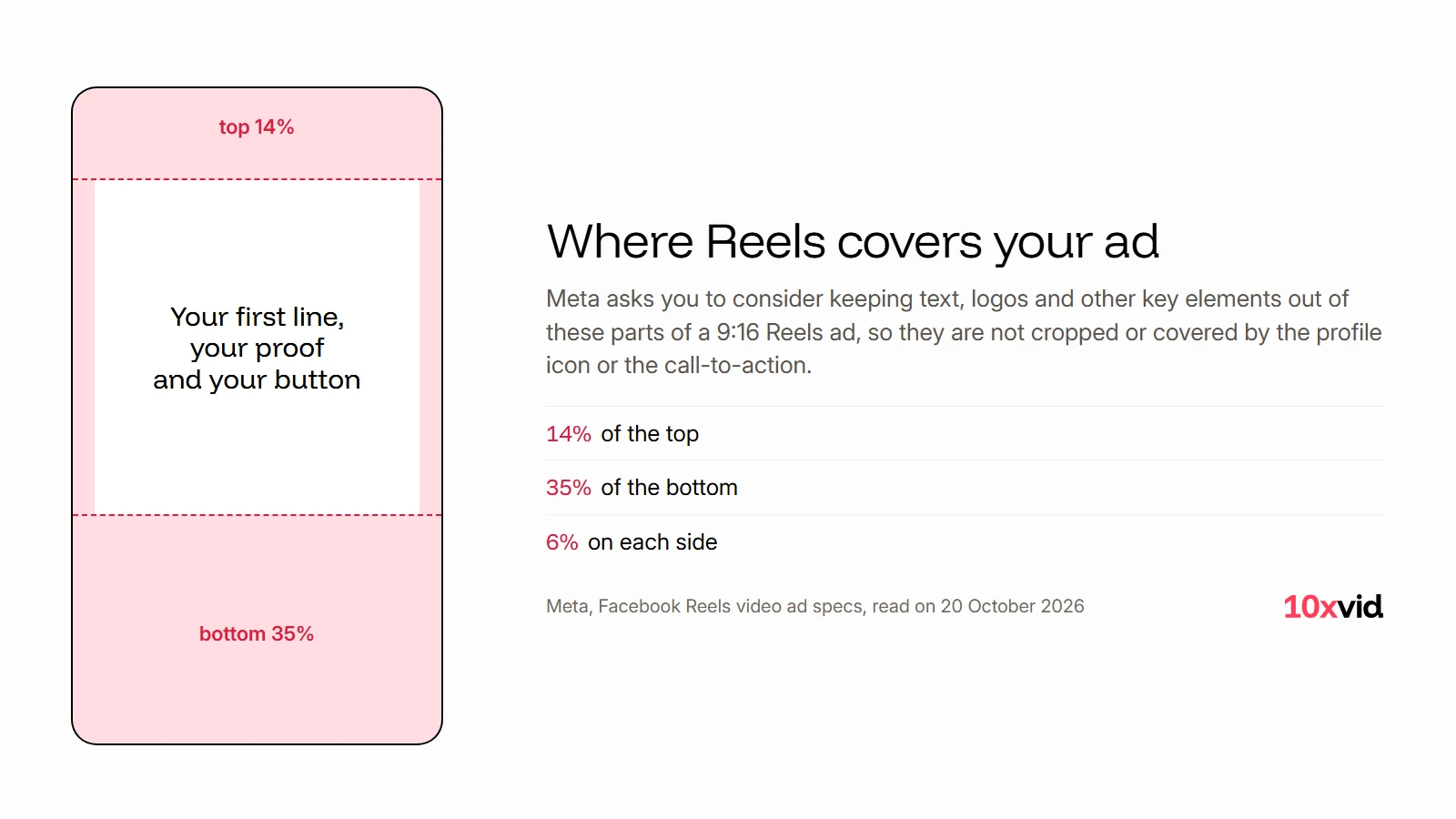
So the first line, the screen that proves it and your button all belong in the middle half of the frame. Check every film against these zones before it runs, whoever made it.
Do Facebook video ads need sound?
Plan for both. Meta's Reels ad page says "Reels default to sound-on", and plays the ad with sound unless the person has turned it off.3 Its specs call sound "Optional, but strongly recommended" for Reels, and captions "Optional, but recommended".1 Meta adds that captions make it "easier for people to watch with the sound off".4
So the ad should make sense muted, through the words on screen. And it should be better with sound: a voice that says the first line, and music that fits.
Which tools make Facebook video ads?
Three kinds, by what you bring.
- A template editor such as Canva or CapCut: you pick a template and add your own footage, text and brand. Both name Facebook among their platforms.67
- A tool that drafts from a link: Captions says you can "Paste in a product link" and get a video ad, in vertical and square formats.8
- An engine that draws from your app: 10xvid reads your app's link and draws the ad from your real screens. It makes 9:16, 1:1 and 16:9 from one run.9
Video ad makers, compared goes through each kind and what you still do yourself.
How do you make a Facebook video ad from your app?
With 10xvid, paste your App Store link or your website into the chat. It reads the words, the pictures, the logo, the colours and the type. Then it writes the whole ad on one map: who it is for, the story in order, why they act, how it looks.9
Choose the shapes when you press Produce: vertical 9:16 for Reels, Stories and the Instagram feed, and square 1:1 for the Facebook feed. Each is laid out for its own frame, not cropped from the other. The films are 5 to 30 seconds, 1080p MP4s at 30 frames a second, mixed to -14 LUFS, the loudness feeds expect.9
What it does not make: the 4:5 shape. Facebook's feed takes the square film, and Meta lists 1:1 as supported there.2 For an ad with a person in it, its UGC style has a generated presenter say the hook before your app takes over.9
Where 10xvid fits
10xvid, motion graphics ads for apps, makes the vertical and the square film for Meta from one link. Both are drawn from your real screens, with music and a voice. Every film is read frame by frame and judged at 8 of 10 before you see it.9 There is more on how to make video ads with AI, step by step.
The first ad is free, with no card: make your first ad.
Questions about Facebook video ads
What size should a Facebook video ad be?
For Reels and Stories, 9:16 at 1440 by 2560. For the Facebook feed, Meta recommends 4:5 at 1440 by 1800, and square 1:1 is supported.12
How long can a Facebook video ad be?
Facebook Reels sets no maximum, Instagram Reels takes up to 15 minutes, and Facebook Stories splits a video longer than 15 seconds into separate cards.1 A short ad is easier to watch to the end: 10xvid's films run 5 to 30 seconds.9
Can one Facebook ad use a different video in each placement?
Yes. Meta calls it "asset customization for placements": you change the media for each placement group inside one ad.5
Should Facebook video ads have captions?
Meta calls captions "Optional, but recommended", and says they make it easier for people watching with the sound off.14 Words on screen do the same job, and they cannot be turned off.
- Meta, Facebook Ads Guide, video ad specs for Facebook Reels, Instagram Reels, Facebook Stories, Facebook Feed and Instagram Feed (facebook.com/business/ads-guide), read on 20 October 2026. ↩
- Meta Business Help Center, "Aspect Ratios Supported by Placements in Meta Ads Manager" (facebook.com/business/help/682655495435254), read on 20 October 2026. ↩
- Meta for Business, "Instagram & Facebook Reels: Create Short Video Ads" (facebook.com/business/ads/facebook-instagram-reels-ads), read on 20 October 2026. ↩
- Meta Business Help Center, "Add Captions to Your Video Ad on Facebook and Instagram" (facebook.com/business/help/1675722002698686), read on 20 October 2026. ↩
- Meta Business Help Center, "About placement asset customization on Facebook, Messenger, Instagram and Meta Audience Network" (facebook.com/business/help/1044825198987622), read on 20 October 2026. ↩
- Canva, "Video Ad Maker" (canva.com/create/advertising-videos), read on 20 October 2026. ↩
- CapCut, "Video ad maker" (capcut.com/create/video-ad), read on 20 October 2026. ↩
- Captions, "Facebook ad maker" (captions.ai/features/facebook-ad-maker), read on 20 October 2026. ↩
- 10xvid.com/engine, read on 20 October 2026; the UGC style as it says on 22 October 2026. ↩