Video Ad Templates: Start Your Next Ad From One That Worked
A video ad template is a plan you reuse: the hook, the story, the ending and the look, ready for new words or new pictures. Stock templates are someone else's plan. In 10xvid, any ad you made can be the template: its blueprint is written from that ad, and you change only what you want.1
 Your ads as templates
In short
- From your own ad: under a finished ad in the chat, "Generate blueprint to iterate" writes a blueprint from it.1
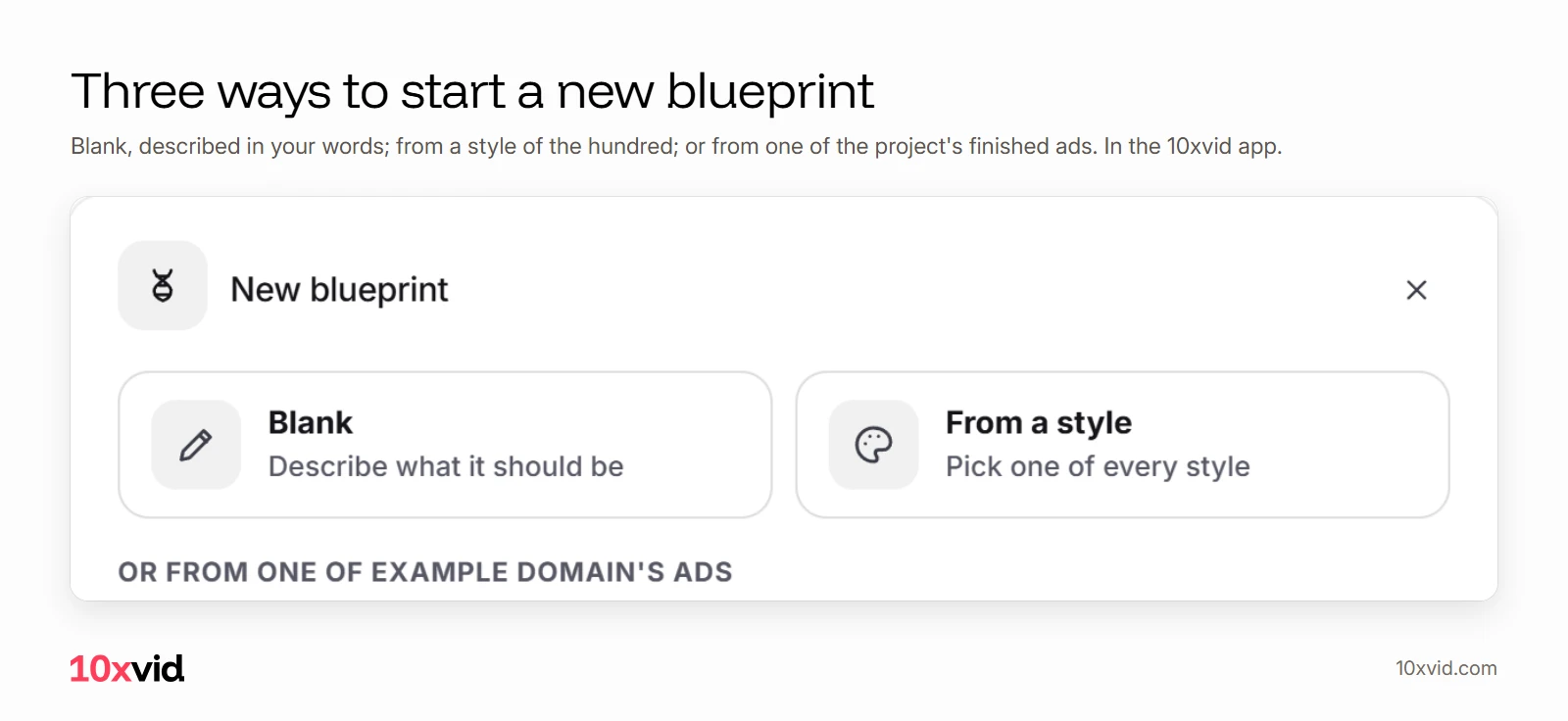
- Three starts: a new blueprint starts blank, from a style, or from one of the project's finished ads.1
- Blank, in your words: describe what it should be, and the blueprint is written from that.1
- Every part changeable: the hook, the story, the look and the sound, each a card, with the seconds on a timeline.1
- Versions kept: every update is kept as a version, so you can go back.2
What is a video ad template?
The structure of an ad, separate from its details. A hook in the first second, a problem, the app showing the answer, proof, and one ask at the end. A stock template gives you that structure with someone else's look. A template made from your own ad keeps the structure that already ran for you.
Why start from an ad that worked?
Because the networks ask for new ads all the time, and starting from zero each time throws away what you learned. Meta's advice for Instagram video: "Start with up to 10 creatives per ad set, then keep the top 5 as evergreen."3 TikTok asks for new ads in an ad group "on a monthly basis at a minimum, but ideally every one to two weeks".4
A template from your winner makes the next version quick, and lets you change one thing at a time. That is how a test reads clean: see creative testing.
How do you turn a finished ad into a template?
Two ways in the 10xvid app:1
- In the chat: under a finished ad, press "Generate blueprint to iterate". The blueprint is written from that ad.
- In the Blueprint tab: press "Create new blueprint", and pick one of the project's finished ads from the list.
What else can a blueprint start from?
Two more starts, beside your ads:1
- Blank: you describe what it should be first, in your words, then press Create. The description goes to the blueprint's writer.
- From a style: the style window opens, and the blueprint is written in the style you pick. See video ad styles.
What can you change on the template?
Every part. The blueprint is the whole ad on one map. Who it is for, the hook, the story, the look and the sound are each a card. Press one to change it, or say it in the chat.12 Under the map, a timeline sets the seconds: see the video ad editor.
Change one part, update the blueprint, and run the next video. The earlier versions stay, so you can go back to the one that worked.2
What does a finished ad look like as a starting point?
Like any ad in your project. This one, for Perla, opens on a problem, gathers the apps into one, and ends on a free trial. As a template, its hook could change while its story stays:
Where 10xvid fits
10xvid, motion graphics ads for apps, writes your first blueprint from your link. Paste your App Store link or website into the chat, and it reads your site.2 After that, your own ads are the templates, in 9:16, 1:1 and 16:9, 5 to 30 seconds.2
Paste your link and make your first ad.
Questions about video ad templates
Can I make a template from an ad I already made?
Yes. In 10xvid, press "Generate blueprint to iterate" under it, or pick it in the New blueprint window.1
Can a project have more than one blueprint?
Yes. Each new blueprint is listed under the project's Blueprint row, beside the others.1
Do I need a template to make an ad?
No. Paste your link, and the first blueprint is written from your site.2
Can I go back to an earlier version?
Yes. Every update is kept as a version.2
- The 10xvid app, the Blueprint tab and the chat, as of 28 October 2026. ↩
- 10xvid.com/engine, read on 28 October 2026. ↩
- Meta Business Help Center, "Best Practices for Instagram Video Ads" (facebook.com/business/help/188534925073536), read on 27 October 2026. ↩
- TikTok Ads Manager help, optimization levers for auction campaigns (ads.tiktok.com/help/article/auction-ad-campaigns-optimization-levers), read on 26 October 2026. ↩