Mobile Game Ads: How to Advertise Your Game With Video
A mobile game ad should show the game being played. Google says most mobile game players are more likely to install after a gameplay video than after a promotional one.1 So open on real gameplay, keep the video between 10 and 30 seconds, and change it a few times a month.
 Mobile game ads
In short
- Show the game, not a trailer. In Google's words: "Most mobile game players are more likely to install a game after watching gameplay videos compared to promotional videos."1
- Win the first 2 to 3 seconds. Google's advice for app ads is to "grab their interest within the first 2 to 3 seconds".2
- Make a video, and a playable where you can. Google, Meta, TikTok, Unity and AppLovin all take playable ads, each capped at 5 MB.34567
- Change them often. Meta recommends "changing your ad creative 2-4 times per month" in its Advantage+ app campaigns.8
What kinds of mobile game ads are there?
Three. All five networks below take videos and playables, and Unity asks for an end card too:
- Video: a short film of the game. Every network takes it.
- Playable: a small piece of the game the viewer can try inside the ad. Meta calls them "interactive video ads that allow you to offer a short preview of your mobile app before people choose to download it".4
- End card: the last screen after a video, as an image or a playable. Unity requires one: "all video ads must also include an end card".9
Each network sets its own rules:
| Network | Video | Playable | One rule worth knowing |
|---|---|---|---|
| Google App campaigns | Up to 20 per ad group, 10 to 30 seconds advised10 | Up to 20 per ad group for game marketers; a ZIP of up to 5MB and 512 files103 | Videos must be hosted on YouTube11 |
| Meta | Up to 50 images or videos at a time in Advantage+ app campaigns8 | One HTML5 file of up to 5MB, built in portrait, with no network calls4 | A playable runs with the App promotion objective12 |
| TikTok | At least 6 videos per ad group, with one playable5 | A .zip smaller than 5MB, only in Smart+5 | No gameplay "inconsistent with your app"5 |
| Unity | 60 seconds or less, H.264 MP4, 16:9 or 9:16, up to 100 MB9 | One minified index.html under 5 MB6 | Every video needs an end card9 |
| AppLovin | 9:16, up to 60 seconds, MP4 or MOV7 | One HTML file of 5 MB or less7 | It "must not redirect to app stores on the first tap"7 |
What should the first seconds of a game ad show?
The game, at once. Google asks app ads to grab interest in the first 2 to 3 seconds, and it notes that successful videos "contain 2+ cut changes within the first 5 seconds".2 TikTok's advice for game ads on its ad network: "Capture the essence of the game by allowing users to experience a real scenario from the game."13
Show the game you ship. TikTok's rule for playable ads is "Don't mislead users with gameplay that is inconsistent with your app or disguise download prompts."5 Apple asks the same of App Store previews: "Show more gameplay than cutscenes so you don't mislead your audience by giving a false impression of gameplay."14
How long should a mobile game ad be?
Google advises videos that "vary in length between 10 to 30 seconds".10 For the video in its ad network's playable ads, TikTok recommends 10 to 25 seconds, with 30 at most.13 Unity and AppLovin take up to 60 seconds, and Unity calls its 30 to 60 second videos "a beta release".97
A 15 second film fits every one of these rules.
What does a game ad look like, second by second?
Agent Games, an arcade of games written by AI and made by 10xvid's founder, has three ads made from one link. It runs in a browser, not a store. Its ads still show the plan: a game on screen early, one idea per film, and one ask.
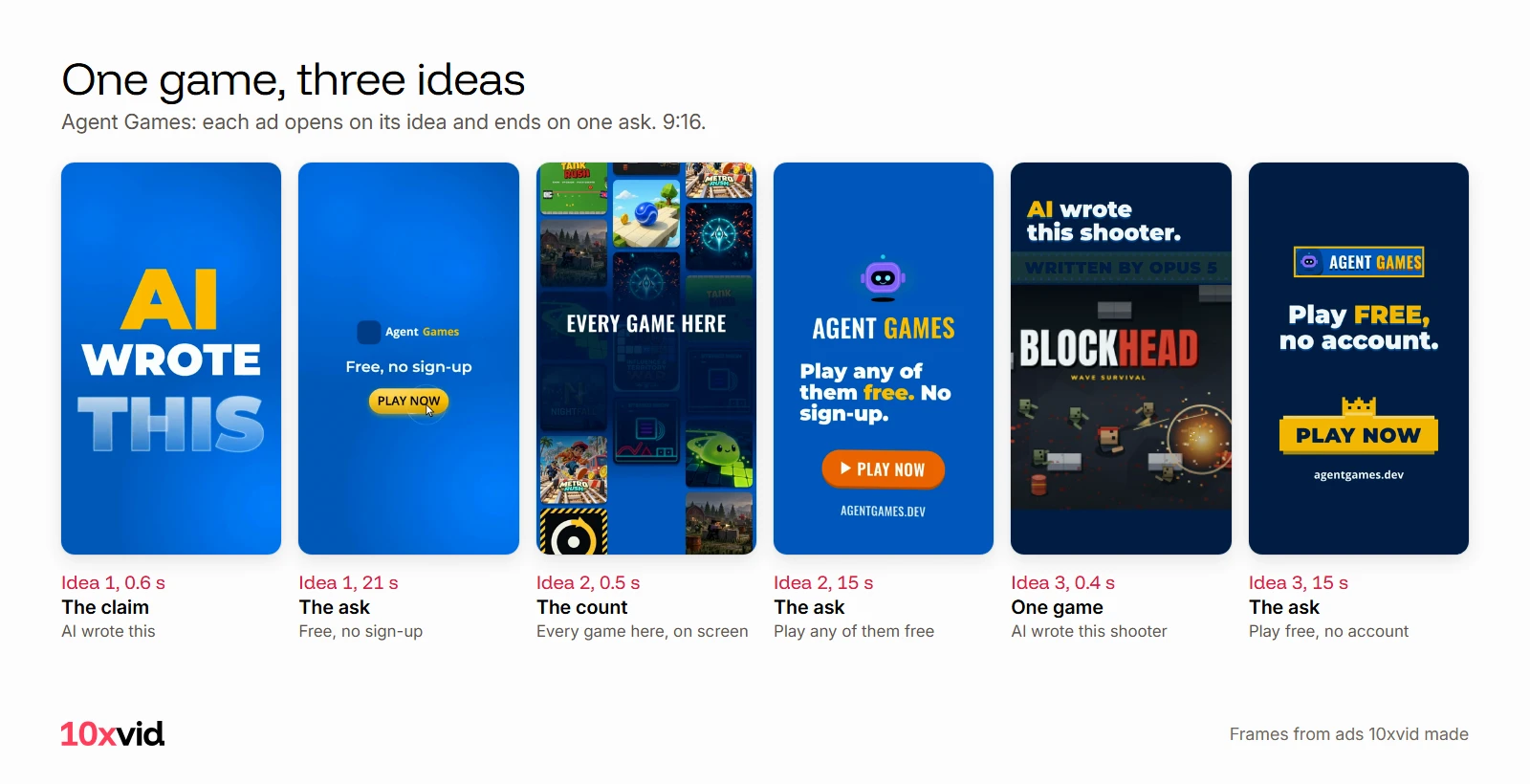
- "AI wrote this." 21 seconds. Every game names the model that wrote it, one tap starts a game, and it asks "Which model is best?" It ends on "Free, no sign-up" and Play now.
- "Every game here written by AI." 15 seconds, at the top of this page. A wall of real game cards, the count of "63 games right in your browser", one game with its model and prompt, then "Play any of them free. No sign-up."
- "AI wrote this shooter." 15 seconds. It opens on the game itself, names the model, shows the prompt and its token count, says "A person approves", then "Play free, no account."
Three ideas from one game also cover the refresh. When one film tires, the next one is already made.
How often should you change game ads?
Often enough that the feed always has something new. Meta recommends changing creative "2-4 times per month" in Advantage+ app campaigns.8 TikTok recommends "at least 6 video assets and one Playable ad per ad group".5 Google takes up to 20 videos per ad group.10
So plan in sets: one game gives several first lines. Show the count, one level, the hardest moment, or the reason it is different. For how a tired ad shows in the numbers, see creative fatigue: how to spot it and fix it.
How do you make game video ads without a studio?
There are two routes:
- Record and cut. Capture the game on a device, then cut the strongest seconds into a film. An App Store preview has to be made this way: Apple asks for "footage captured on device".14
- From your link. With 10xvid, paste your App Store link or your website into the chat. It reads the page and draws the ad from the pictures and screens it already shows. So what the ad shows of your game is what your page shows.15
10xvid writes a blueprint of the ad: who it is for, the story in order, why they act, how it looks. Change any part, then press Produce for 9:16, 1:1 and 16:9 from one run, 5 to 30 seconds long.15
Motion V1 Flash makes a flat motion graphics film in about five minutes.15 It makes the video, not the playable.
Where 10xvid fits
10xvid, motion graphics ads for apps, makes the video part of a game campaign from your link: every shape, from your real screens. Every film is read frame by frame and judged at 8 of 10 before you see it.15 Want a person in it? The UGC style has a generated person who could be your user say the hook to their phone. Then your app takes over under their voice.15
The first ad is free, with no card: make your first ad. For TikTok's rules in full, see TikTok ad specs. For the wider plan, see app advertising with video ads.
Questions about mobile game ads
What is the best ad format for mobile games?
A video of real gameplay, plus a playable where the network takes one. Google found players install more after gameplay videos, and TikTok recommends six videos and a playable per ad group.15
How big can a playable ad be?
5 MB on all five networks here: Google, Meta, TikTok, Unity and AppLovin.34567 Meta also asks for one HTML5 file, built in portrait, with no external network calls.4
What shape should a mobile game video ad be?
9:16 for the feeds and for AppLovin; Unity takes 16:9 or 9:16.79 Make both if you can, since one network may want each.
Can a game ad show gameplay that is not in the game?
No. TikTok's rules forbid gameplay "inconsistent with your app", and Apple asks previews for more gameplay than cutscenes.514
- Google Ads Help, "About gameplay videos" (support.google.com/google-ads/answer/13268252), read on 22 October 2026. ↩
- Google Ads Help, "Make better creative assets for App campaigns" (support.google.com/google-ads/answer/6167158), read on 22 October 2026. ↩
- Google Ads Help, "About HTML5/Playable ads for App campaigns" (support.google.com/google-ads/answer/9981650), read on 22 October 2026. ↩
- Meta Business Help Center, "About Playable Ads" (facebook.com/business/help/2138506633095259) and "Specifications for Playable Ads Assets" (facebook.com/business/help/412951382532338), read on 22 October 2026. ↩
- TikTok Ads Manager help, "About TikTok Playable ads" (ads.tiktok.com/help/article/playable-ads) and "Create TikTok Playable ads" (ads.tiktok.com/help/article/how-to-create-playable-ads-on-tiktok-ads-manager), read on 22 October 2026. ↩
- Unity User Acquisition docs, "Playable specifications" (docs.unity.com/en-us/user-acquisition/creatives/specifications/playable), read on 22 October 2026. ↩
- AppLovin support, "Creative specs and guidelines" for app advertisers (support.applovin.com/en/growth/promoting-your-apps/welcome-to-applovin/creative-specs-and-guidelines), read on 22 October 2026. ↩
- Meta Business Help Center, "Creative recommendations and reporting for Advantage+ app campaigns" (facebook.com/business/help/716015512512235), read on 22 October 2026. ↩
- Unity Grow docs, "Video asset specifications" (docs.unity.com/en-us/grow/acquire/creatives/video/specifications), read on 22 October 2026. ↩
- Google Ads Help, "Best practices guide: Setting up your App campaigns" (support.google.com/google-ads/answer/6167162), read on 22 October 2026. ↩
- Google Ads Help, "Asset types for App campaigns" (support.google.com/google-ads/answer/9948381), read on 22 October 2026. ↩
- Meta Business Help Center, "Upload a Playable Source File" (facebook.com/business/help/338940216641734), read on 22 October 2026. ↩
- TikTok Ads Manager help, "How to create TikTok Ad Network (formerly TikTok Pangle) Playable ads" (ads.tiktok.com/help/article/how-to-create-tiktok-pangle-playable-ads), read on 22 October 2026. ↩
- Apple Developer, "App Previews" (developer.apple.com/app-store/app-previews), read on 22 October 2026. ↩
- 10xvid.com/engine, read on 22 October 2026. ↩