YouTube Shorts Ads: Specs and How to Make One for an App
A YouTube Shorts ad is a vertical video that plays between Shorts, and viewers can swipe past it at once. For an app, App campaigns already show ads on Shorts, but they cannot buy Shorts alone. Make it 9:16, 1080 by 1920, with sound, and 10 to 30 seconds if you want an install. That is from Google's own help pages, read on 27 October 2026.123
 YouTube Shorts ads
In short
- What it is: "Ads on Shorts are immediately swipeable video or image ads that appear between Shorts in the Shorts Feed."4
- Campaigns: six campaign types can show Shorts ads. App campaigns and Performance Max include Shorts but cannot buy it alone.325
- Shape: 9:16 at 1080 by 1920 pixels, at least 720 by 1280. The video must be on YouTube, public or unlisted.16
- Length: "For action-oriented ads, use 10-30 second vertical videos."1
- Sound: on by default in Shorts, and Google says sound has "been shown to increase conversions by over 20%".71
What is a YouTube Shorts ad?
A full-screen ad in the Shorts feed, between the Shorts people swipe through. Google says Shorts average 200 billion daily views.8
How it behaves, in Google's words:
- Skipping: "Users can immediately skip the ad by swiping up / down." If they scroll back, the ad is shown again, and no new impression is counted.910
- The button: it appears after 3 seconds in App, Performance Max and Demand Gen campaigns. In Video view and Video reach, after 10.1
- The text: your channel name and a description of up to 90 characters. The button card takes a 40-character headline.1
- The icons: like, dislike, comment and share sit over the ad. Only the comments button can be turned off.10
Which campaigns show ads on Shorts?
Six campaign types, and not all of them let you choose Shorts alone:
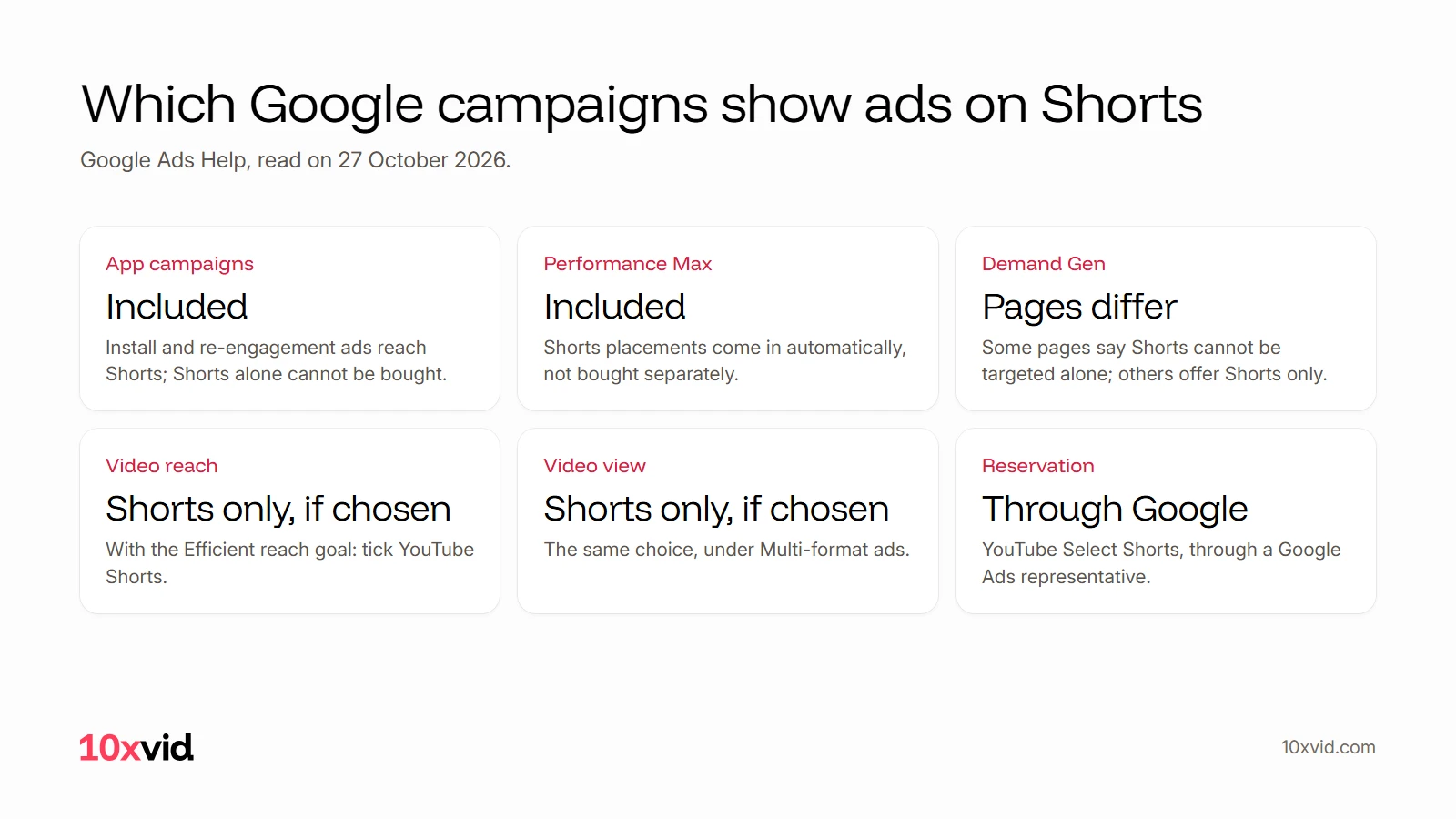
- App campaigns: "You’ll not be able to buy only YouTube Shorts ads with App Campaigns."2
- Performance Max: it "automatically includes YouTube Shorts placements", but they cannot be bought separately.5
- Video reach and Video view: you can run on Shorts only, by ticking "YouTube Shorts" under "Multi-format ads".11
- Demand Gen: Google's pages differ. One says these campaigns "are not a way to target Shorts specifically"; another says "Target Shorts-only with a vertical video."1213
For an app, that means an App campaign. Shorts is one of its places, so the vertical video you give it is the one Shorts plays. Lead forms do not work on Shorts ads at all.10
What are the specs for a Shorts ad?
Google's numbers, from its own pages:
| Spec | What Google says |
|---|---|
| Shape | 9:16. A horizontal video plays "with blurred top and bottoms"1 |
| Size | 1080 by 1920 pixels recommended; 720 by 1280 the least6 |
| Length | Under 60 seconds recommended; 10 to 30 for action; 10 to 60 in App campaigns1 |
| Where it lives | Uploaded to YouTube, public or unlisted1 |
| Sound | On by default, autoplay on7 |
| Text | Channel name, a description up to 90 characters, a 40-character headline1 |
A video longer than 60 seconds can run, but "only the first 60 seconds will play on the Shorts feed".1
App campaigns want more than one shape. Google says vertical videos "may show up on in-stream, in-feed, and YouTube Shorts", and also that "Square videos are still recommended for App, Demand Gen and Performance Max campaigns."14 Give the campaign 9:16, 1:1 and 16:9.
Where should the words go in a Shorts ad?
Away from the edges, where YouTube puts its own text and buttons. Google gives two zones:
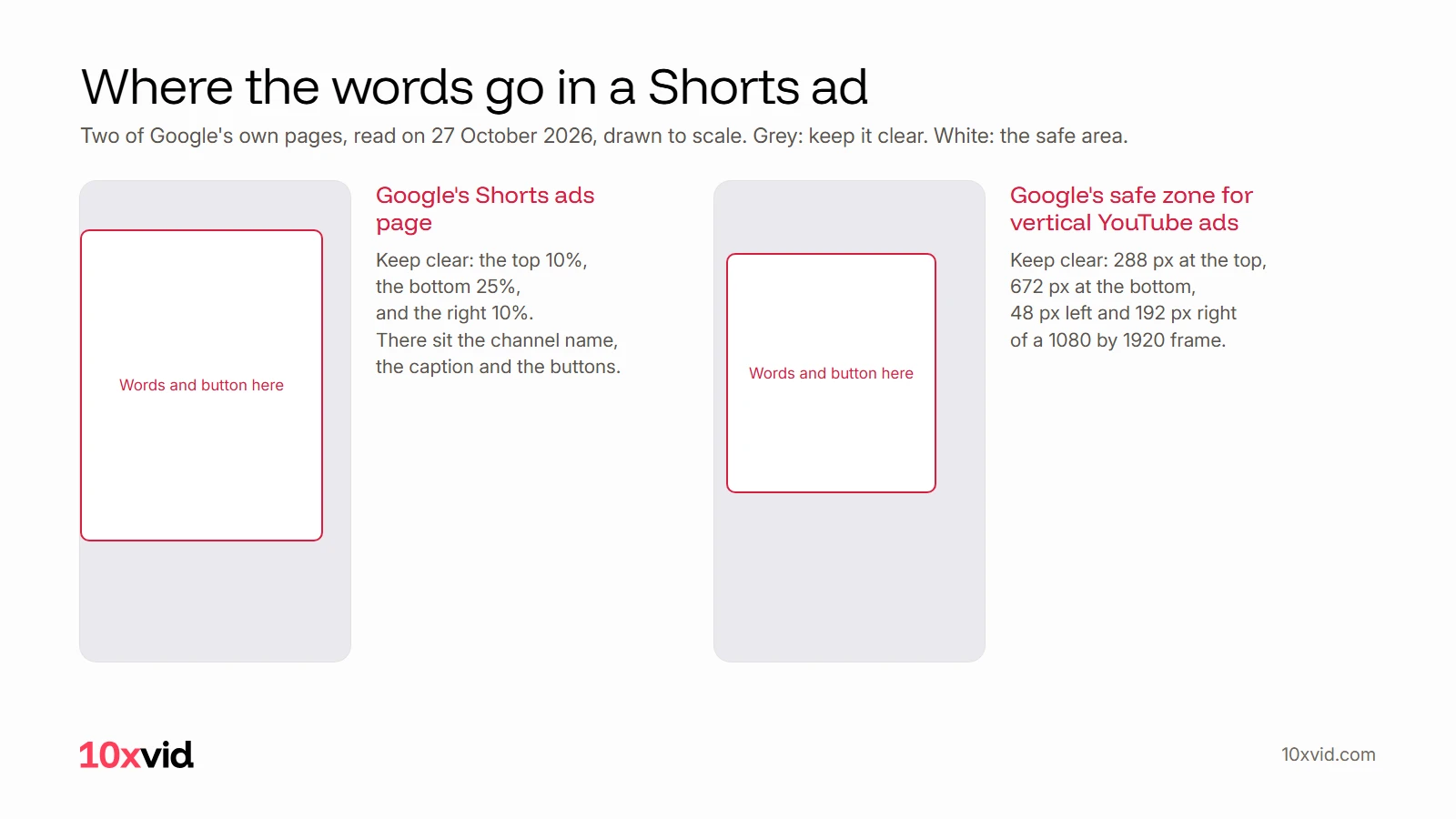
- Google's Shorts ads page: "Avoid placing critical elements in the top 10%, the bottom 25%, and the right-hand 10% of the frame, where the channel name, caption, and engagement buttons reside."15
- Google Ads Help: its safe zone figure for vertical ads keeps 288 pixels clear at the top and 672 at the bottom. On the sides, 48 left and 192 right.6
The second zone is the larger one. Words inside it are inside both.
What does Google advise for the first seconds?
Hook first, sound on, and make it look like a Short:
- The hook: "Hook viewers in the first few seconds with action, a question, or a surprising visual."15 For App campaigns, Google says to "grab their interest within the first 2 to 3 seconds".16
- The sound: "Announce yourself with audio." And from the Shorts ABCDs: "Be unavoidable."17
- The look: "Blend in with surrounding organic content."1 And "A subtle, low-key tone works better than a sales pitch."18
- The words: "As some inventory defaults to audio off, captions should be included."16
- The end: "Include a clear, intentional and relevant CTA."17
Here is a vertical ad of the kind Shorts plays, its first line on screen from the first frame:
For what goes in that first line, see video ad hooks.
How do you run a Shorts ad for an app?
Five steps:
- Make the vertical video: 9:16, 1080 by 1920, 10 to 30 seconds, with sound and with the words on screen.
- Make the square and the landscape too, for the rest of the App campaign's places.
- Upload all three to YouTube, public or unlisted.1
- Add them to an App campaign. Google may make a video for you from your store listing if you add none, so add your own.19
- Read the results by campaign. App campaigns and Performance Max show no separate report for Shorts.20
Where 10xvid fits
10xvid, motion graphics ads for apps, makes the vertical video and its square and landscape cuts in one run. Paste your App Store link or website into the chat. It reads your site and draws the ads from your real app screens, 5 to 30 seconds long.21
Each film is a 1080p MP4. Solo is about 30 video ads a month for $79.2122 The first ad is free, with no card: make your first ad. For YouTube's other formats, see how to make a YouTube ad.
Questions about YouTube Shorts ads
How long can a YouTube Shorts ad be?
Under 60 seconds is recommended, and 10 to 30 seconds for an ad that asks for an action. Past 60 seconds, only the first 60 play in the Shorts feed.1
Can I run ads only on YouTube Shorts?
With Video reach (Efficient reach) or Video view campaigns, yes. Not with App campaigns or Performance Max.1125
What size is a YouTube Shorts ad?
9:16, at 1080 by 1920 pixels. The least is 720 by 1280.6
Can people skip a Shorts ad?
Yes, at once, by swiping up or down.9
- Google Ads Help, "YouTube Shorts ads: Asset specs and best practices" (support.google.com/google-ads/answer/16041697), read on 27 October 2026. ↩
- Google Ads Help, YouTube Shorts ads with App campaigns (support.google.com/google-ads/answer/16042354), read on 27 October 2026. ↩
- Google Ads Help, a guide to YouTube Shorts ads (support.google.com/google-ads/answer/16042243), read on 27 October 2026. ↩
- YouTube Help, advertising formats (support.google.com/youtube/answer/2467968), read on 27 October 2026. ↩
- Google Ads Help, YouTube Shorts ads with Performance Max (support.google.com/google-ads/answer/16042151), read on 27 October 2026. ↩
- Google Ads Help, video ad safe zones and sizes (support.google.com/google-ads/answer/13547298), read on 27 October 2026; the safe zone numbers are in its figure. ↩
- Google Ads Help, Demand Gen video specs (support.google.com/google-ads/answer/17141078), read on 27 October 2026. ↩
- Google, The Keyword, on Shorts measurement (blog.google/products/ads-commerce/youtube-mrc-accreditation-shorts), 3 June 2026, read on 27 October 2026. ↩
- Google Ads Help, getting started with YouTube Shorts ads (support.google.com/google-ads/answer/16040527), read on 27 October 2026. ↩
- Google Ads Help, YouTube Shorts ads FAQ (support.google.com/google-ads/answer/16041383), read on 27 October 2026. ↩
- Google Ads Help, YouTube Shorts ads with Video reach campaigns (support.google.com/google-ads/answer/16042150), read on 27 October 2026. ↩
- Google Ads Help, YouTube Shorts ads with Demand Gen (support.google.com/google-ads/answer/16040528), read on 27 October 2026. ↩
- Google Ads Help, YouTube performance (support.google.com/google-ads/answer/14693848), read on 27 October 2026. ↩
- Google Ads Help, square and vertical videos (support.google.com/google-ads/answer/9128498), read on 27 October 2026. ↩
- Google, YouTube Shorts ads (business.google.com/us/ad-solutions/youtube-ads/shorts-ads), read on 27 October 2026. ↩
- Google Ads Help, creative assets for App campaigns (support.google.com/google-ads/answer/6167158), read on 27 October 2026. ↩
- Google Ads Help, the ABCDs of effective video ads (support.google.com/google-ads/answer/14783551), read on 27 October 2026. ↩
- Google, Think with Google, short-form video advertising tips (business.google.com/us/think/search-and-video/short-form-video-advertising-tips), read on 27 October 2026. ↩
- Google Ads Help, asset types for App campaigns (support.google.com/google-ads/answer/9948381), read on 27 October 2026. ↩
- Google Ads Help, reporting for YouTube Shorts ads (support.google.com/google-ads/answer/16042063), read on 27 October 2026. ↩
- 10xvid.com/engine, read on 27 October 2026. ↩
- 10xvid.com/pricing, read on 27 October 2026. ↩