TikTok Creative Center: Find Top Ads, Then Make Your Own
TikTok Creative Center is TikTok's free library of ads that worked, trends and creative tools. In TikTok's words, it "is a free, public home to an ever-growing suite of creative resources". Its Top Ads dashboard lets you filter real auction ads and see the second each one peaked.12
 TikTok Creative Center
In short
- Top Ads: "See high-performing auction ads on TikTok", filtered by region, industry, objective and more.3
- The graph: each ad has a second by second chart to "find the most successful engagement moment in the video".2
- Log in: without it, Top Ads shows "only five ads".2
- Then make your own: take the structure of a top ad, not the ad. Hook, selling points, a clear call to action.4
What is TikTok Creative Center?
A free set of pages inside TikTok for Business. TikTok describes it as a place "where you can discover the latest trends, ad examples, best practices, and tools to create effective TikTok ads".1 Its old address now opens a page called TikTok One Creative Suite, with Top Ads, Trends and Creative Tools in the menu.5
You can browse without an account: "a login is not required to access Creative Center". TikTok still recommends logging in "to take advantage of and see all of its features, data, and insights".1
How do you find top ads in TikTok Creative Center?
Open Top Ads and narrow it down. TikTok's help page lists the filters: "Search for a specific product or keyword or filter by Region, Industry, Campaign Objective, Likes, and Time frame." On a desktop you can also filter by ad language and ad format.2
Then sort. The help page lists reach, click-through rate, 2-second and 6-second view rates, and on a desktop conversion rate and likes.2 The live page showed fewer sort options on 23 October 2026: For You, Reach and CTR.3
Log in before you start: "If you are not logged in, you will see only five ads."2
What does Top Ads show about each ad?
Its numbers and its best moment. Click See Analytics on any ad to "learn more about the ad's background information and performance". The graph "shows relative performance metrics, second-by-second, to help you easily find the most successful engagement moment in the video".2
Every ad there was put there by its advertiser: "All ads featured in Top Ads in the Creative Center are authorized by advertisers inside TikTok Ads Manager".6 They come from real campaigns: "We only share creatives that have already been published in advertising campaigns". And they stay TikTok's to show, not yours to reuse: they "will be watermarked and will not be available for download".7
How do you read a top ad?
Second by second, against one question: what does each moment do? TikTok's own structure for ads that sell is "Have a hook, highlight your unique selling points, and end with a clear call-to-action."4 Mark where each part starts.
Here is one of our own ads, read that way:
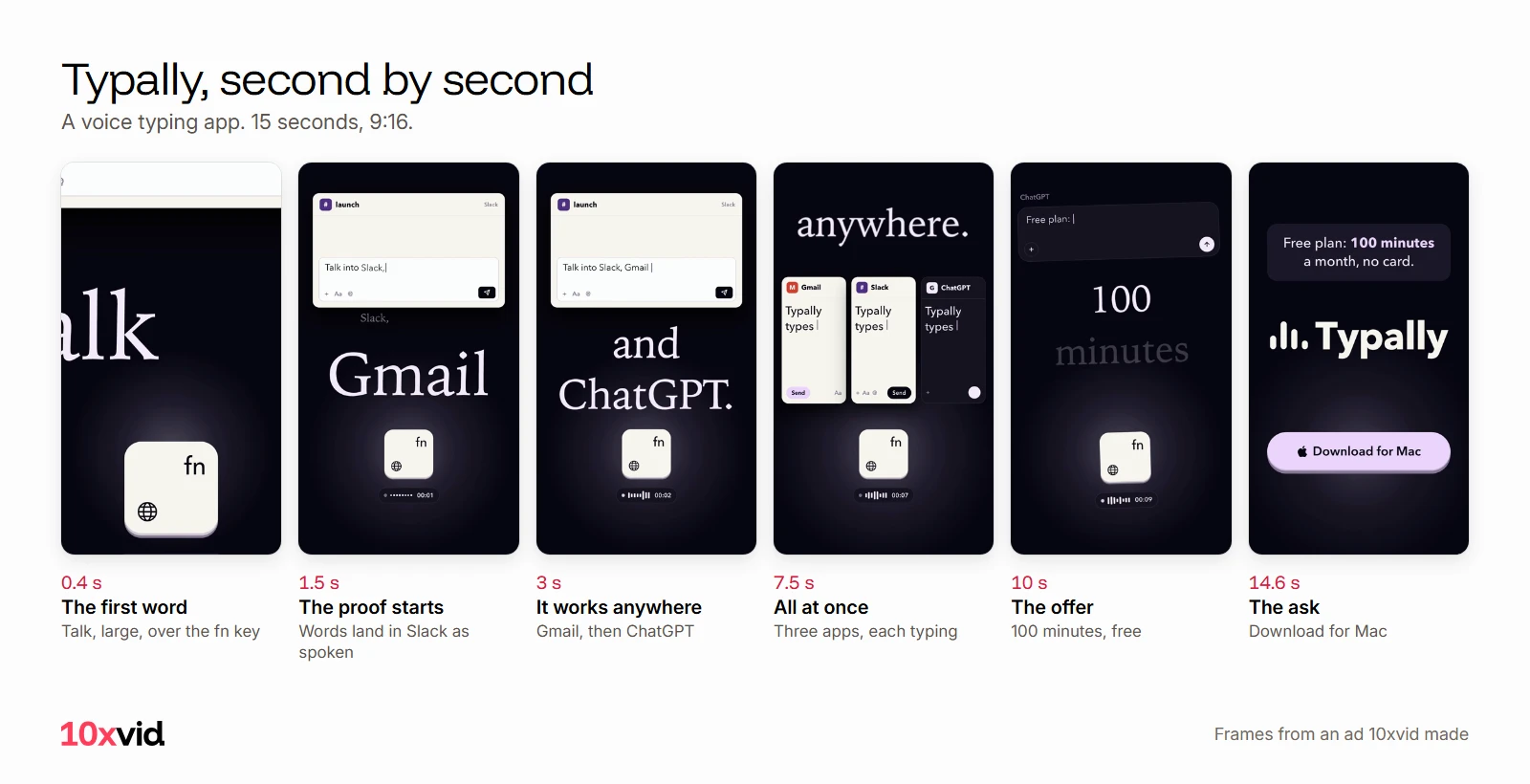
Then check it against TikTok's timing:4
- The hook: "Prioritize your hook in the first 6 seconds to boost engagement and increase watch time."
- The offer: "Introduce your content proposition in the first 3 seconds for better recall and awareness."
- The words: "We recommend displaying 5-10 words per second when using text."
The peak on the graph tells you which of those moments held people. Write that down, not the ad's look.
What is in Trends?
Trending hashtags by industry. TikTok's help page says Trends "displays trending hashtags by industry", and that See Analytics on a hashtag shows "its trendline, related videos, audience insights, regional popularity, and related hashtags".8 Log in first: the help page's own steps start there.
Trends suits organic posts and topical ads. A hashtag tells you what people watch this week; Top Ads tells you what made someone tap.
How do you turn a top ad into your own ad?
Keep the structure, change everything else. Use your own product, your own screens and your own words.
- Pick three top ads in your industry and region, sorted by CTR.
- Mark each one's hook, proof and ask, with the second each starts.
- Write your hook in the same place: a line about your viewer, in the first 3 seconds.
- Show your proof: the screen of your app where the result appears.
- End on one ask, with your name on screen.
- Make several versions. TikTok suggests "between 3-5 different creatives per ad group" and adds "it is always better to use creatives with big differences".4
With 10xvid, paste your App Store link or your website into the chat. It reads the page and writes a blueprint: who the ad is for, the story in order, why they act, how it looks. Put what you learned from Top Ads into the hook, then press Produce for 9:16, 1:1 and 16:9.9
What creative tools does TikTok Creative Center have?
Symphony Creative Studio, TikTok's own AI video tool. Its help page calls it "an AI-powered TikTok video generation tool" and a "free creation tool".10 Its product avatar feature lets you "Upload an image of a product or app screen" and get clips of an avatar showing it.10 "An AI-generated label is added to all exported videos."11
That is a generated video. 10xvid works the other way: Motion V1 draws every frame from your real screens and type, and does not generate pixels.9
Where 10xvid fits
10xvid, motion graphics ads for apps, makes the ad after the research. You bring what Top Ads taught you; it brings your screens, words and offer. Every film is read frame by frame and judged at 8 of 10 before you see it.9 For TikTok's sizes, lengths and safe zones, see TikTok ad specs and sizes.
The first ad is free, with no card: make your first ad.
Questions about TikTok Creative Center
Is TikTok Creative Center free?
Yes. TikTok calls it "a free, public home" for trends, ad examples, best practices and tools.1
Do I need to log in to TikTok Creative Center?
Not to browse, but Top Ads shows only five ads without a login, and TikTok's Trends steps start with logging in.128
Can I download ads from TikTok Top Ads?
No. Top Ads creatives "will be watermarked and will not be available for download".7
How do I get my own ad into Top Ads?
Authorize it in TikTok Ads Manager. Only ads already published in campaigns, with TikTok as a placement, can be authorized.7
- TikTok Ads Manager help, "About Creative Center" (ads.tiktok.com/help/article?aid=14099), last updated July 2026, read on 23 October 2026. ↩
- TikTok Ads Manager help, "How to use the Top Ads Dashboard" (ads.tiktok.com/help/article/how-to-use-the-top-ads-dashboard), read on 23 October 2026. ↩
- TikTok Creative Center, Top Ads (ads.tiktok.com/business/creativecenter/inspiration/topads/pc/en), read on 23 October 2026. ↩
- TikTok Ads Manager help, "Creative best practices for performance ads" (ads.tiktok.com/help/article/creative-best-practices), read on 23 October 2026. ↩
- TikTok, ads.tiktok.com/business/creativecenter/pc/en, which opens ads.tiktok.com/creative/creativeCenter, "TikTok One Creative Suite", read on 23 October 2026. ↩
- TikTok Ads Manager help, "About Top Ads" (ads.tiktok.com/help/article/top-ads), read on 23 October 2026. ↩
- TikTok Ads Manager help, asset authorization for Top Ads (ads.tiktok.com/help/article/asset-authorization-top-ads), read on 23 October 2026. ↩
- TikTok Ads Manager help, "How to use Trends" (ads.tiktok.com/help/article/how-to-use-trends), last updated July 2026, read on 23 October 2026. ↩
- 10xvid.com/engine, read on 23 October 2026. ↩
- TikTok Ads Manager help, "About Symphony Creative Studio" (ads.tiktok.com/help/article/about-symphony-creative-studio), read on 23 October 2026. ↩
- TikTok Ads Manager help, "How to edit videos with Symphony Creative Studio" (ads.tiktok.com/help/article/how-to-edit-videos-with-symphony-creative-studio), read on 23 October 2026. ↩