Product Demo Video Maker: Your App Shown From Its Screens
A product demo video maker turns your product's screens into a film that shows what it does. Most start from a recording: you use the app while the tool captures it. 10xvid starts from your app's link instead, and draws a short demo ad from the screens your site already shows.1
 Product demo videos
In short
- Recorders such as Loom and Screen Studio capture your screen as you use it. They suit walkthroughs and tutorials.23
- Demo tools such as Supademo and Arcade turn your screens into interactive demos and short videos for your site and sales.45
- Presenter tools such as Synthesia put an AI avatar beside your screen recording.6
- 10xvid makes the short ad version from your link, with no recording, in 9:16, 1:1 and 16:9. Your first ad is free.17
What is a product demo video?
A short film of your product doing its job. There are two kinds, and where it plays decides which you need:
- The walkthrough runs for minutes and is watched on purpose: in onboarding, in a sales call, on a help page.
- The demo ad runs for 15 to 30 seconds in a feed, watched by people who did not ask for it. It has to show the result at once. TikTok's advice is to "Introduce your content proposition in the first 3 seconds".8
A recorder makes the first kind well. The second kind is an ad, and it is cut like one.
Which product demo video maker fits which job?
Each tool starts from something different. Prices are as each page showed them on 22 October 2026:
| Tool | What goes in | What comes out | Free plan | Paid from |
|---|---|---|---|---|
| Loom | Your screen and camera, recorded2 | A video to share by link2 | 25 videos, 5 minutes each, up to 720p2 | Business, $18 per user a month2 |
| Screen Studio | Your Mac's screen, recorded; zooms are added for you3 | MP4 in 720p, 1080p or 4K at up to 60 fps, in 16:9, 1:1 or 9:163 | Not stated | $9 a month yearly, or $29 monthly3 |
| Supademo | Your product's screens, captured step by step, or a recording4 | Interactive demos, guides and videos; MP4 up to 1080p with a watermark on Free4 | 5 guided demos and 50 video recordings4 | Scale, $38 per creator a month billed yearly, or $50 monthly4 |
| Arcade AI Video | A prompt, your Arcade demos and your brand kit5 | Teasers, sizzle reels and product overviews5 | 250 credits once, videos up to 30 seconds, with a watermark5 | Pro, $49 a month billed yearly, or $59 monthly5 |
| Synthesia | A script and a screen recording6 | A demo narrated by an AI avatar6 | 10 minutes of video, shared by link with a watermark; downloads start on Starter6 | Starter, $18 a month billed yearly, or $29 monthly6 |
| 10xvid | Your app's link1 | A 5 to 30 second ad drawn from your real screens, in 9:16, 1:1 and 16:91 | The first ad, with no card7 | Solo, about 30 video ads a month for $797 |
How do you make a product demo video?
The same six steps work in any of these tools:
- Pick one job. One feature and one result, written as a sentence a user would say.
- Find the screen where the result appears. That moment is the demo. The clicks before it are not.
- Open on the result or the problem. In a feed, the first seconds decide whether anyone stays.8
- Put the words on screen. Set them as type, so the demo works with the sound off.
- End on one ask. Google's advice for video ads: "Ask them to take action."9
- Make each shape. Meta recommends 9:16 for Reels and Stories; YouTube and most websites play 16:9.10
What does a 15 second demo ad look like?
This one was made for Typally, a voice typing app made by 10xvid's founder. It demos one feature: it takes the "um" out of what you say.
- 0 to 2 s: the problem. A spoken sentence appears with its ums marked, under "Ramble, ums and all."
- 3 to 5 s: the feature at work. "2 fillers removed", then "4 fillers removed", then "The sentence you meant."
- 6 to 8 s: where it works. "Lands clean in Gmail, Slack or Word."
- 9 to 15 s: the offer and one ask. "Download it free", "100 minutes a month, no card", and a Download free button.
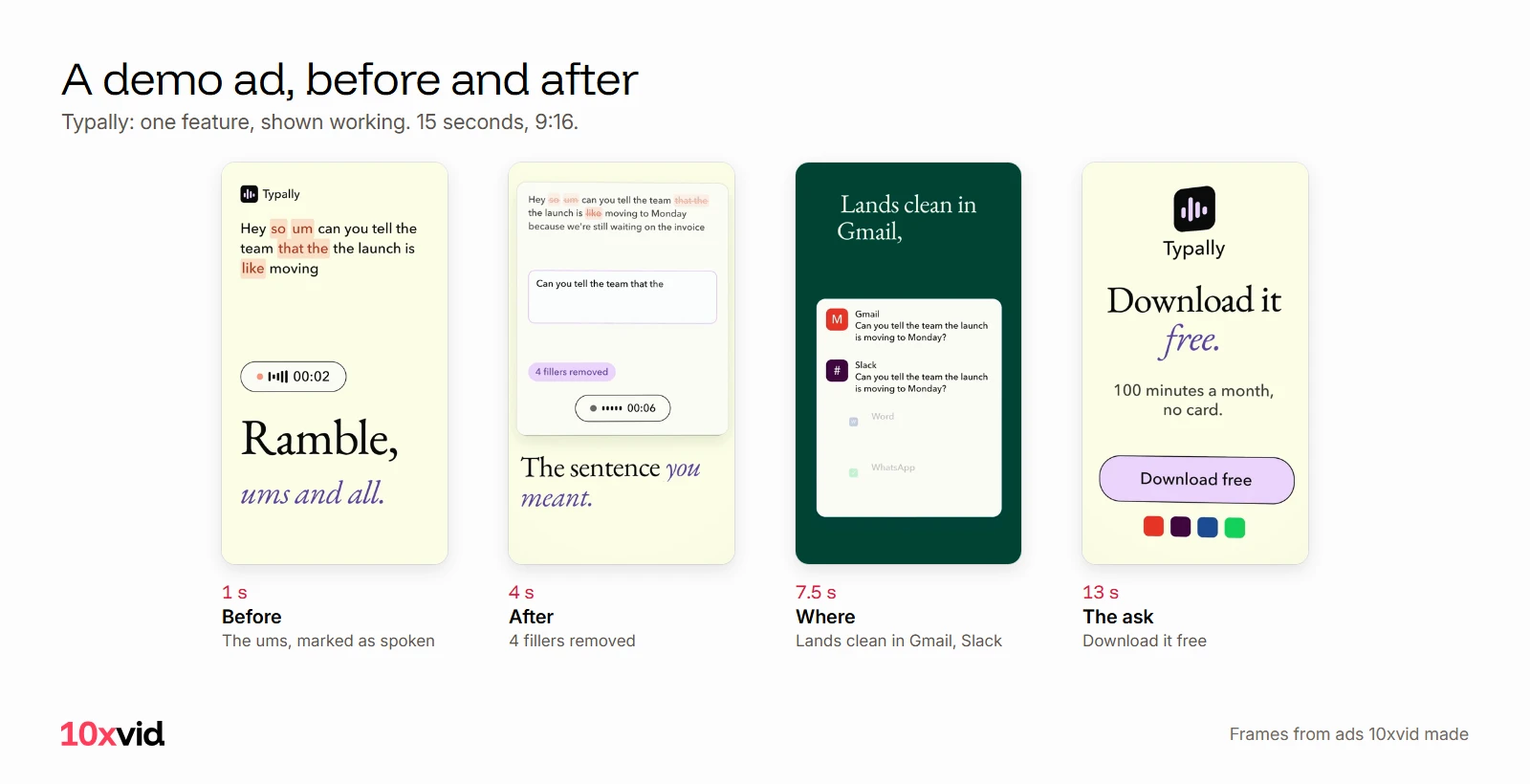
Nothing in it explains how the app works. It shows the before, the after and where it lands.
Where 10xvid fits
10xvid, motion graphics ads for apps, makes the demo ad, not the walkthrough. Paste your App Store link or your website into the chat. It reads the page and writes a blueprint: who the ad is for, the story in order, why they act, how it looks. Press Produce, and the film is drawn from your real screens in every shape.1
It does not record your screen. It uses the pictures and screens your site already shows, so a screen that is not on your site needs to be added there first.1
Every film is read frame by frame and judged at 8 of 10 before you see it.1 Want a person in it? The UGC style has a generated person who could be your user say the hook to their phone. Then your app takes over under their voice.1
Keep your recorder for the long walkthrough. For the ad, make your first ad free, with no card. For the steps in order, see how to make video ads with AI.
Questions about product demo videos
What is the best product demo video maker?
It depends on the job. For a walkthrough, a recorder such as Loom or Screen Studio. For a click-through demo on your site, Supademo or Arcade. For an AI narrator, Synthesia. For a short demo ad from your link, 10xvid.234561
How long should a product demo video be?
As an ad, 15 to 30 seconds. Google advises app campaign videos "between 10 to 30 seconds".11 A walkthrough can run longer; Loom's free plan stops at 5 minutes a video.2
Can I make a product demo video without recording my screen?
Yes. 10xvid draws it from the pictures and screens your site already shows.1 Arcade's AI Video starts from a prompt and the demos you have already made in Arcade.5
Is there a free product demo video maker?
Several have free plans: Loom, Supademo, Arcade and Synthesia, the last three with a watermark on what you export.2456 10xvid's first ad is free, with no card.7
- 10xvid.com/engine, read on 22 October 2026. ↩
- Loom, pricing (loom.com/pricing) and screen recorder (loom.com/screen-recorder), read on 22 October 2026. ↩
- Screen Studio, home page and pricing (screen.studio), read on 22 October 2026. ↩
- Supademo, home page (supademo.com) and pricing (supademo.com/pricing), read on 22 October 2026. ↩
- Arcade, AI Video knowledge base (docs.arcade.software/kb/ai-video) and pricing (arcade.software/pricing), read on 22 October 2026. ↩
- Synthesia, product demo video maker (synthesia.io/tools/product-demo-video-maker) and pricing (synthesia.io/pricing), read on 22 October 2026. ↩
- 10xvid.com/pricing, read on 22 October 2026. ↩
- TikTok Ads Manager help, "Creative best practices for performance ads" (ads.tiktok.com/help/article/creative-best-practices), read on 21 October 2026. ↩
- Google Ads Help, "About the ABCDs of effective video ads" (support.google.com/google-ads/answer/14783551), read on 21 October 2026. ↩
- Meta, Facebook Ads Guide, video ad specs for Facebook and Instagram Reels, Stories and Feed (facebook.com/business/ads-guide), read on 20 October 2026. ↩
- Google Ads Help, "Best practices guide: Setting up your App campaigns" (support.google.com/google-ads/answer/6167162), read on 22 October 2026. ↩