AI Ad Image Generator: Image Ads Built From Your Own Site
An AI ad image generator makes the picture for an ad. Most generate it with an image model from a prompt; others start from a template. Image V1 does neither: it lays the ad out as a page from your own site's pictures, words and colours.1
 AI ad image generator
In short
- Prompt to image tools such as ChatGPT Images, Ideogram and Microsoft Designer generate the picture, words included.234
- Template tools such as Canva's Magic Design start from a ready layout you fill in.5
- Link to ad tools such as Canva Grow, Predis.ai, Pencil and AdCreative.ai read a website or brand kit, then use models and templates.6789
- Image V1 sets every word as type from your site, checks each one on the drawn picture, and "does not generate photos".1
What is an AI ad image generator?
A tool that makes the still image for a feed or story ad. There are three kinds, by how the picture is made:
- Generated: an image model paints the whole picture from your prompt, the words too.
- Templated: you start from a designed layout and swap in your words and photos.
- Laid out from your site: a tool reads your website and builds the ad from what is there.
The kind decides what you get back. A generated image is pixels; a laid out ad is type, shapes and your own pictures.
How do the main AI ad image tools make the picture?
From each maker's own pages, read on 24 October 2026:
| Tool | What goes in | How the picture is made | To start | Paid from |
|---|---|---|---|---|
| ChatGPT Images | A prompt, an image or a template | Generated by OpenAI's model2 | "available on all tiers", with limits2 | Go, €8 a month (shown in euros)10 |
| Ideogram | A prompt, with the words in quotes | Generated; built for text in images3 | 30 credits a week, and free images are public3 | Plus, $20 a month or $15 billed yearly3 |
| Microsoft Designer | A description, and images | "powered by DALL-E"4 | Free, for personal, non-commercial use4 | Microsoft 365 Personal, $9.99 a month4 |
| Canva | A template, a prompt, or your website link | Magic Design from templates; Magic Media from AI models5 | Up to 20 AI uses on Free5 | Pro, €110 a year (shown in euros)5 |
| Predis.ai | A prompt or a product URL | "Generative AI models trained on large sets of ads"7 | 3 days free, with a card7 | Core, $32 a month or $19 billed yearly7 |
| Pencil | A brand kit and a description | Image models and templates8 | Six ads free8 | Core, $14 a month8 |
| AdCreative.ai | Your website URL | "Patent-pending proprietary image rendering"9 | 7-day trial, with a card9 | Starter, $39 a month or $20 billed yearly9 |
| 10xvid Image V1 | Your App Store link or website | Laid out as a page from your own pictures, colours and type1 | The first ad is a free video11 | Solo, about 40 image ads a month for $7911 |
Why does text go wrong in generated ad images?
Because the words are painted, not typed. Microsoft says it plainly: "any text in the generated images may not be in the requested language or may have spelling errors."4 OpenAI's developer docs: "Although significantly improved, the model can still struggle with precise text placement and clarity."12
Even the tool built for text warns about it. Ideogram's docs: "An image can still come back with a doubled letter or a missing word." And: "Text drawn inside a flat image is part of that image's pixels; selecting the image does not make its letters typeable."13
In an ad, the words carry the offer, the price and the name. A misspelled price is an ad you cannot run, and a painted word cannot be corrected, only made again.
How does Image V1 make an ad image?
It builds the ad as a page, then draws it. In 10xvid's words, one session "reads your site, sketches three ways in, chooses a kind of ad and a way of drawing it, lays the poster out as a page from your own pictures, colours and type, and checks every word on it before it is drawn".1
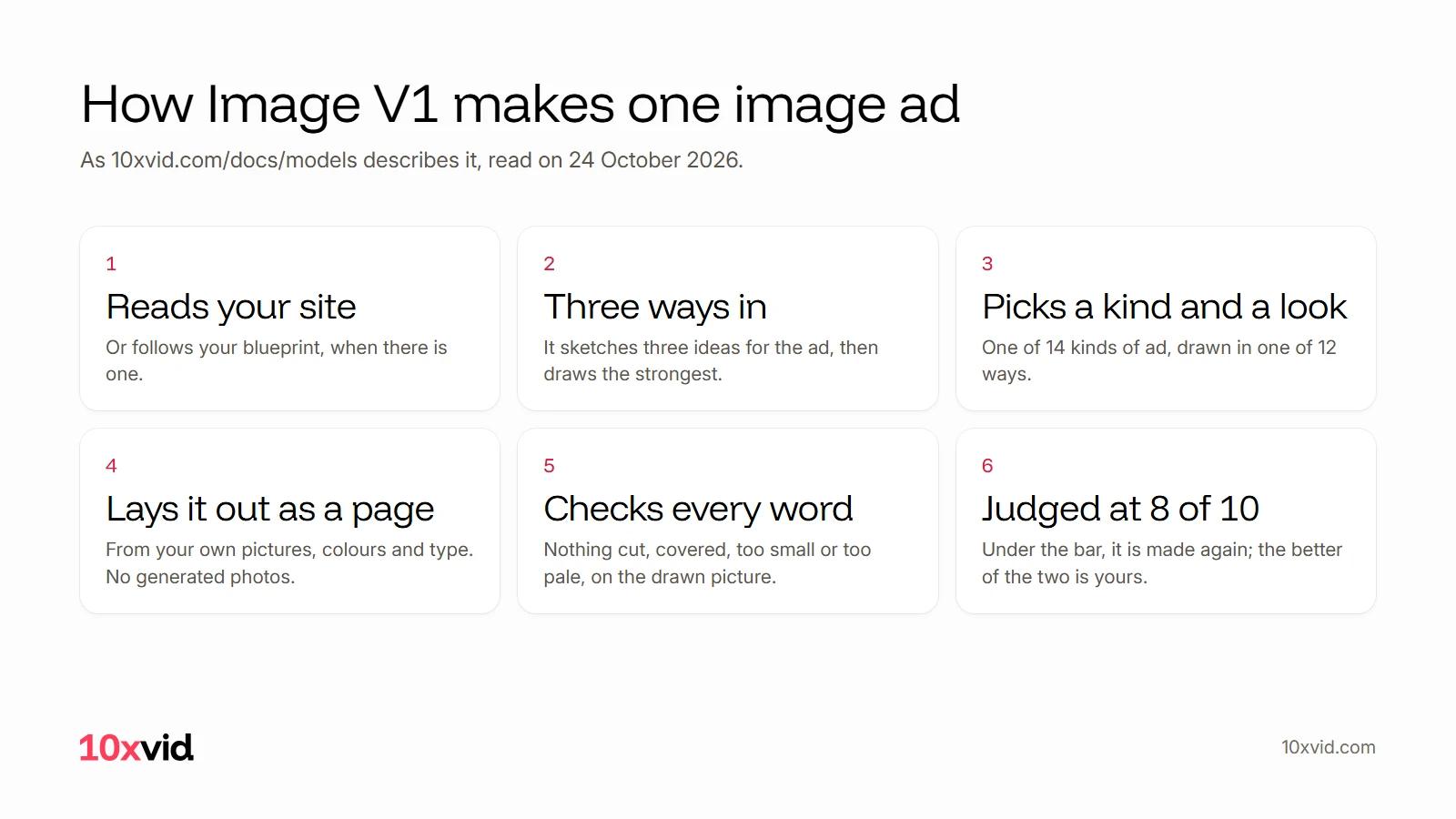
Because the words are type, they come out as written. "Nothing is cut, covered, too small or too pale: each word is checked on the drawn picture."1 A judge then reads each image at 8 of 10; one under the bar is made again, "and the better of the two is yours".1
What does an Image V1 ad look like?
Here is one, in 16:9, for a voice typing app:
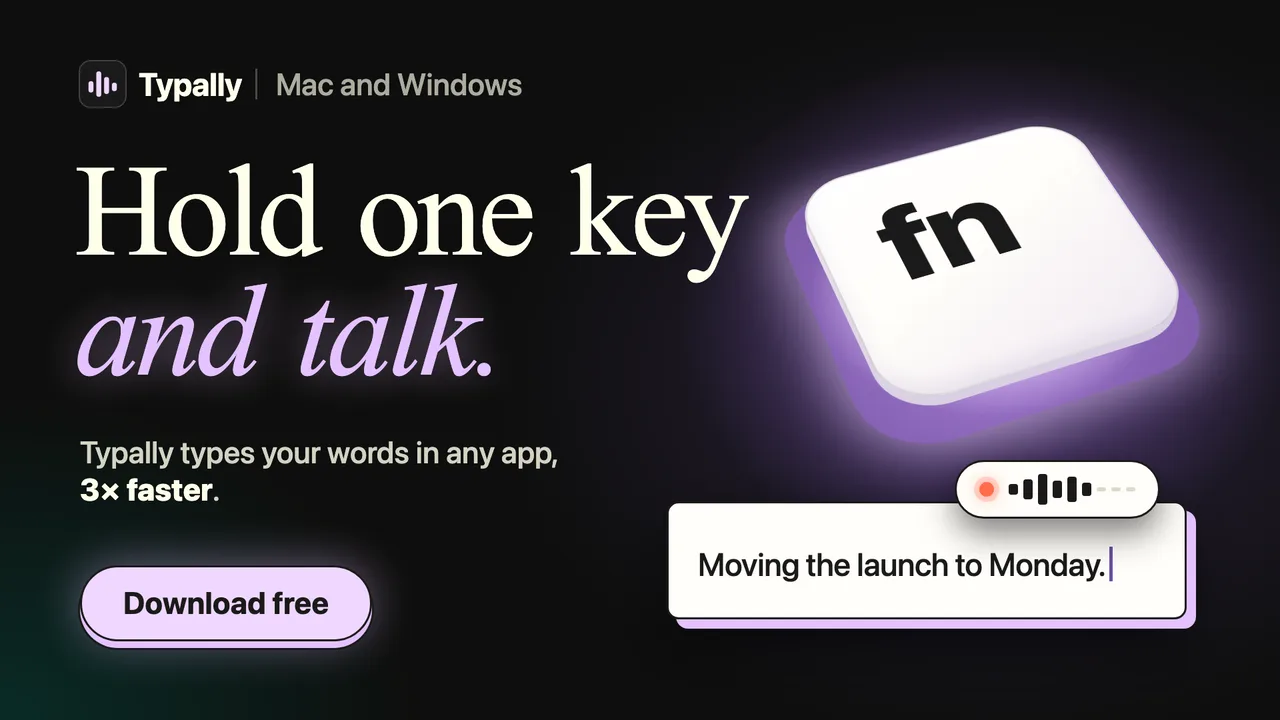
Every word in it is set type: the headline, the sentence typing itself, the button. Nothing in it is a person or a scene made up by a model. More of them are on the engine page, in all three shapes.
Which kind of AI ad image tool should you use?
It depends on what the ad needs:
- A picture of something that does not exist, such as a scene or a mood: an image model.
- A quick design you will edit by hand: a template tool.
- Ads built from your real product, with exact words: a tool that lays the ad out from your site, such as Image V1.
Check the terms before you run the ads. Microsoft Designer, for one, "is licensed for personal, non-commercial use with your Microsoft account".4
Where 10xvid fits
10xvid, motion graphics ads for apps, makes image ads with Image V1 beside its video ads, from the same link. It makes 9:16, 1:1 and 16:9, and one image takes about eight minutes, its second pass included.1 Image ads come with every paid plan.11
The free first ad is a video, with no card: make your first ad. For the video side, see AI ad generators, compared.
Questions about AI ad image generators
What is the best AI ad image generator?
For exact words and your own product, one that lays the ad out from your site. For an imagined scene, an image model.13
Can AI image generators spell?
Not reliably. Microsoft and OpenAI both say text in generated images can come out wrong.412
Is there a free AI ad image generator?
Several have free tiers: Ideogram, Microsoft Designer, Canva and ChatGPT, with limits.3452 Check commercial use first.
Does Image V1 use stock photos or AI-made pictures?
No. It uses the pictures your site already shows and the ones you add: "It does not generate photos."1
- 10xvid.com/docs/models, Image V1, and 10xvid.com/engine, read on 24 October 2026. ↩
- OpenAI Help Center, "Images in ChatGPT" (help.openai.com/en/articles/11084440-images-in-chatgpt), read on 24 October 2026. ↩
- Ideogram, text rendering (ideogram.ai/features/text-rendering), pricing (ideogram.ai/pricing) and plans (docs.ideogram.ai), read on 24 October 2026. ↩
- Microsoft Support, Microsoft Designer FAQ and welcome page (support.microsoft.com/designer), and Microsoft 365 Personal (microsoft.com/en-us/microsoft-365/microsoft-designer), read on 24 October 2026. ↩
- Canva, Magic Design (canva.com/magic-design), AI image generator (canva.com/ai-image-generator) and pricing (canva.com/pricing), read on 24 October 2026. ↩
- Canva, Canva Grow AI ad generator (canva.com/ai-ad-generator), read on 24 October 2026. ↩
- Predis.ai, home page, AI ad creatives (predis.ai/ai-for-adcreatives) and pricing (predis.ai/pricing), read on 24 October 2026. ↩
- Pencil, pricing (trypencil.com/pricing) and help on templates, read on 24 October 2026. ↩
- AdCreative.ai, ad creatives (adcreative.ai/ad-creatives) and home page pricing, read on 24 October 2026. ↩
- OpenAI, ChatGPT pricing (chatgpt.com/pricing), read on 24 October 2026. ↩
- 10xvid.com/pricing, read on 24 October 2026. ↩
- OpenAI developer docs, image generation guide (developers.openai.com/api/docs/guides/image-generation), read on 24 October 2026. ↩
- Ideogram docs, text in images and text and layers (docs.ideogram.ai), read on 24 October 2026. ↩