After Effects alternatives when all you need is ads
Which After Effects alternative fits you depends on what you make. For motion graphics in general, Maxon Autograph, DaVinci Resolve, Blender and Cavalry cost nothing, and Apple Motion is a one-time purchase. For ads alone, a tool that builds the film from a script or from your app's link skips the timeline altogether.
 After Effects alternatives
In short
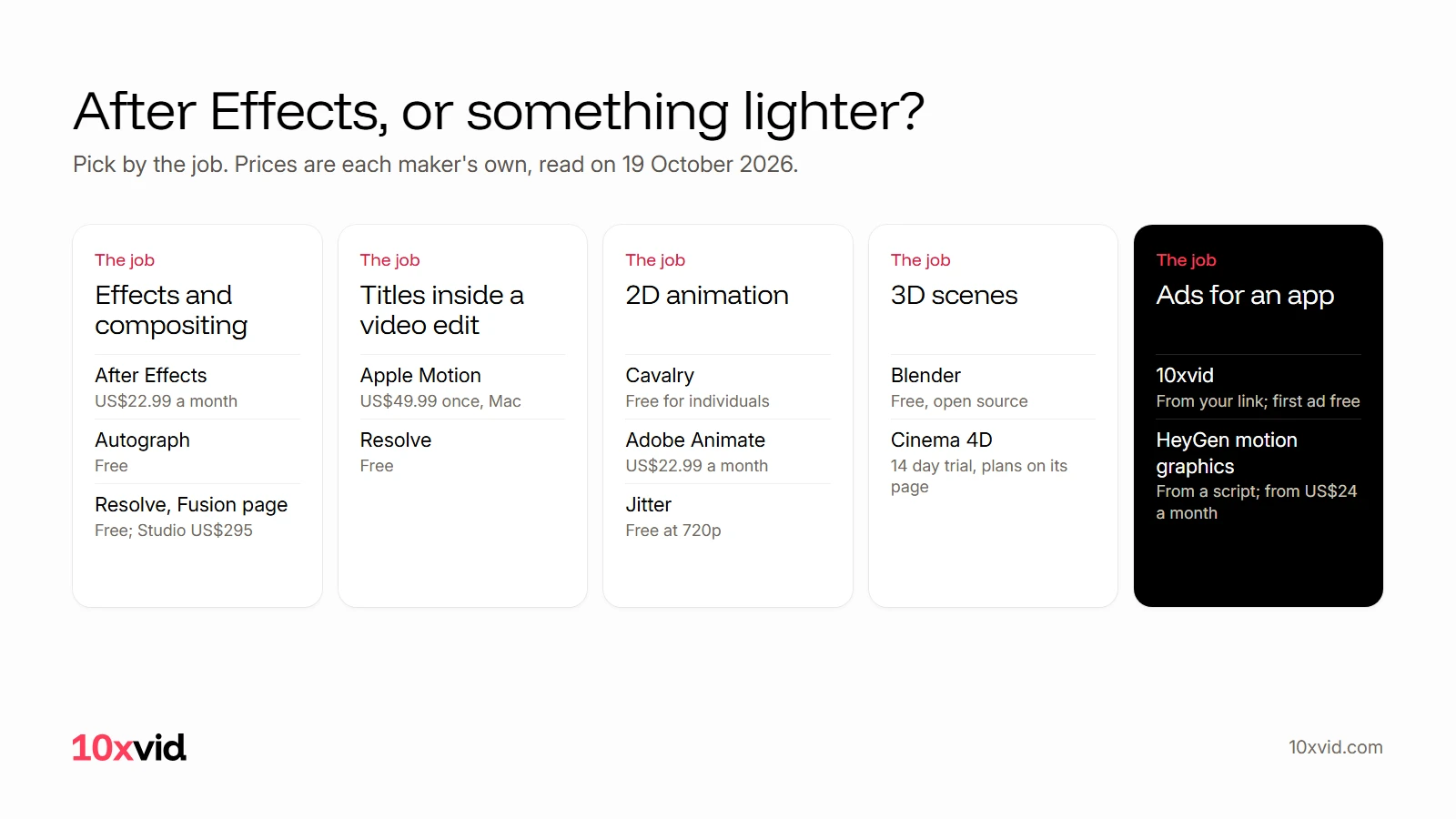
- Free, full tools: Autograph (motion graphics and compositing, Windows and macOS), DaVinci Resolve with Fusion (node based effects and motion graphics; the Studio version is US$295), Blender (free and open source, 3D), Cavalry (2D animation, free for individuals).
- Cheaper and simpler: Apple Motion at US$49.99 once, Mac only. Jitter in the browser, free at 720p with a watermark. Rive for animation that runs inside an app, free to start.
- No timeline at all: HeyGen's motion graphics tool animates a script you write (a free plan, paid from US$24 a month). 10xvid draws ads from your app's link.
- After Effects itself: US$22.99 a month on the annual plan, with a seven-day trial.
What does After Effects cost, and what are you paying for?
Adobe lists After Effects at "US$22.99/mo for the Annual, billed monthly plan", with a seven-day free trial. Creative Cloud Pro, the bundle it belongs to, is "Regularly at US$69.99/mo".1 Adobe's own line for the product: "After Effects is a motion design and visual effects software app."
That line says what you are paying for: a general tool for motion design and visual effects. An ad for an app uses a small corner of it: some type, a few shapes, your screens, a timeline of 15 to 30 seconds, an export in three shapes. If that corner is all you need, a lighter tool, or no timeline at all, does the job.
Which After Effects alternatives are free?
Four full tools cost nothing, by their makers' own pages, read on 19 October 2026.
- Maxon Autograph. "Autograph is free for everyone!" It covers motion graphics, visual effects and compositing, with 2D and 3D assets on one timeline, and runs on Windows and macOS. Only Maxon's plugins, Universe and the Red Giant OFX tools, need a licence.2
- DaVinci Resolve. The free version "works with virtually all 8-bit video formats at up to 60fps" and up to Ultra HD. Fusion is its visual effects and motion graphics page, and it "features a node based workflow". It runs on Mac, Windows and Linux; DaVinci Resolve Studio is US$295.3
- Blender. "Free and Open Source software, forever", under the GPL, for commercial work too. It is a 3D creation suite for Windows, macOS and Linux, and the right choice when the ad needs real 3D.4
- Cavalry. "Professional, real-time animation software. For free." Its maker calls it "Professional 2D animation software, built for depth", free for individuals on Mac and Windows, with an enterprise plan sold through sales.5
Which alternatives are cheaper and simpler?
- Apple Motion. US$49.99, once, on the Mac App Store. Apple's first line is "Designed for video editors, Motion is a powerful motion graphics tool", for 2D and 3D titles, transitions and effects that publish to Final Cut Pro. Mac only; the current version needs macOS 26.6 or later.6
- Jitter. A free plan with 720p, 30 frames a second export, a watermark, three workspace files, Figma import and video, GIF and Lottie export. Its paid plans, Pro, Max and Ultra, remove the watermark and are priced per editor and month on its pricing page.7
- Rive. "Build interactive UI, motion, and games that run natively on mobile, desktop, web, consoles, TVs, and vehicles." Free at US$0 a seat, then Cadet at US$9 and Voyager at US$32 a seat a month. It is for animation inside your product, not for a video ad.8
Which alternatives skip the timeline?
Two kinds of tool do.
The first animates a script. HeyGen's motion graphics tool says: "Type a script, pick a style, and get a polished animated video in minutes." It "splits it into scenes and times motion to every line automatically", and you adjust "colors, fonts, backgrounds, pacing, and transitions in the editor, no keyframes involved". You can upload your own images, logos and illustrations. There is a free plan, and paid plans start at US$24 a month.9 You still write the script, pick the style and bring the assets.
The second reads your app and makes the ad from what it finds. That is what 10xvid does, below. Neither replaces After Effects for effects work; both replace it for the ad.
The alternatives, side by side
Prices are each maker's own, read on 19 October 2026.
| Tool | Price | Runs on | What it suits |
|---|---|---|---|
| After Effects | US$22.99 a month, annual plan billed monthly | Desktop | Motion design and visual effects, the whole field1 |
| Maxon Autograph | Free | Windows, macOS | Motion graphics, VFX and compositing, 2D and 3D on one timeline2 |
| DaVinci Resolve | Free; Studio US$295 | Mac, Windows, Linux | Editing, grading and node based motion graphics in Fusion3 |
| Blender | Free, open source | Windows, macOS, Linux | 3D scenes and objects4 |
| Cavalry | Free for individuals | Mac, Windows | 2D animation with procedural rigs5 |
| Apple Motion | US$49.99 once | Mac | Titles, transitions and effects for a video edit6 |
| Jitter | Free at 720p with a watermark; paid plans per editor | Browser | Quick motion from Figma designs, Lottie export7 |
| Rive | Free; US$9 and US$32 a seat a month | Browser and desktop apps; runtimes for apps, web, games | Animation that runs inside a product8 |
| HeyGen motion graphics | Free plan; paid from US$24 a month | Browser | Animated scenes from a script you write9 |
| 10xvid | The first ad is free; plans on the pricing page | Browser | Motion graphics ads for an app, drawn from its link10 |
What does an ad need that a timeline does not give you?
Three things, if the ad is for an app on Meta, TikTok or YouTube.
Three shapes. A feed ad runs as 9:16 for Reels and TikTok, 1:1 for feeds and 16:9 for YouTube. In a timeline tool, you lay each shape out yourself. 10xvid makes all three from one blueprint, each laid out for its frame and not cropped.10
Many angles, not copies. Meta treats ads that look alike as one ad, so a test needs ads that start from different ideas.11 In a timeline tool, every angle is a new project. 10xvid starts each ad from a different angle, and a company's next ad is told its last three, so no two come out alike.10
A check before you post. Readable text, nothing cut off, nothing that jumps, a clear call to action. In a timeline tool, you are the check. 10xvid's engine reads every frame and judges the film at 8 of 10 before you see it.10
Where 10xvid fits
10xvid, motion graphics ads for apps, is the route with no timeline. Paste your App Store link or website. Motion V1 reads the words, the pictures, the logo, the colours and the type, writes a blueprint of the ad you can change part by part, and draws every frame from your real screens. It does not generate pixels, so the words stay sharp. Each ad comes in 9:16, 1:1 and 16:9, from 5 to 30 seconds, as a 1080p MP4. Motion V1 Flash makes a flat motion graphics film in about five minutes.10
Where After Effects has keyframes, 10xvid has the blueprint: the hook, the story in order, the proof, the offer, the look and the voice, on one map. Change the hook and the film follows.
The first ad is free, with no card: make your first ad. If the ad needs 3D, effects or a drawn character, one of the tools above is the better choice, and the films are yours to cut further in any of them.
Questions about After Effects alternatives
Is there a free alternative to After Effects?
Yes. Maxon Autograph, DaVinci Resolve, Blender and Cavalry are free by their makers' own pages. Autograph covers motion graphics and compositing on a timeline, Resolve's Fusion page does the same with nodes, Blender covers 3D, and Cavalry covers 2D animation.2345
What is the closest free program to After Effects?
By what its maker says it does, Autograph covers the same ground: motion graphics, visual effects and compositing, with 2D and 3D on one timeline, on Windows and macOS.2
Is Apple Motion an alternative to After Effects?
For titles, transitions and effects that go into a Final Cut Pro edit, yes: it costs US$49.99 once and runs on Mac only. Apple's own line is "Designed for video editors".6
Can AI replace After Effects for ads?
For the ad, two kinds of tool can: one that animates a script you write, and one that draws the ad from your app's link. For visual effects and compositing, no. Pick by what you make.
- Adobe, "After Effects" product page (adobe.com/products/aftereffects.html), read on 19 October 2026. ↩
- Maxon, "Autograph" (maxon.net/en/autograph), read on 19 October 2026. ↩
- Blackmagic Design, "DaVinci Resolve" (blackmagicdesign.com/products/davinciresolve), read on 19 October 2026. ↩
- Blender, "About" and "Download" pages (blender.org), read on 19 October 2026. ↩
- Cavalry (cavalry.studio), read on 19 October 2026. ↩
- Apple, "Motion" on the Mac App Store, and apple.com/final-cut-pro/motion, read on 19 October 2026. ↩
- Jitter, pricing page (jitter.video/pricing), read on 19 October 2026. The plan prices did not show to our reader; the free plan's limits did. ↩
- Rive, pricing page (rive.app/pricing), read on 19 October 2026. ↩
- HeyGen, "AI motion graphics" tool page (heygen.com/tool/ai-motion-graphics), read on 19 October 2026. ↩
- 10xvid.com/engine and 10xvid.com/pricing, read on 19 October 2026. ↩
- 10xvid.com, "Many angles, not many copies", read on 19 October 2026. ↩