Instagram Reels ad specs and how to make one for your app
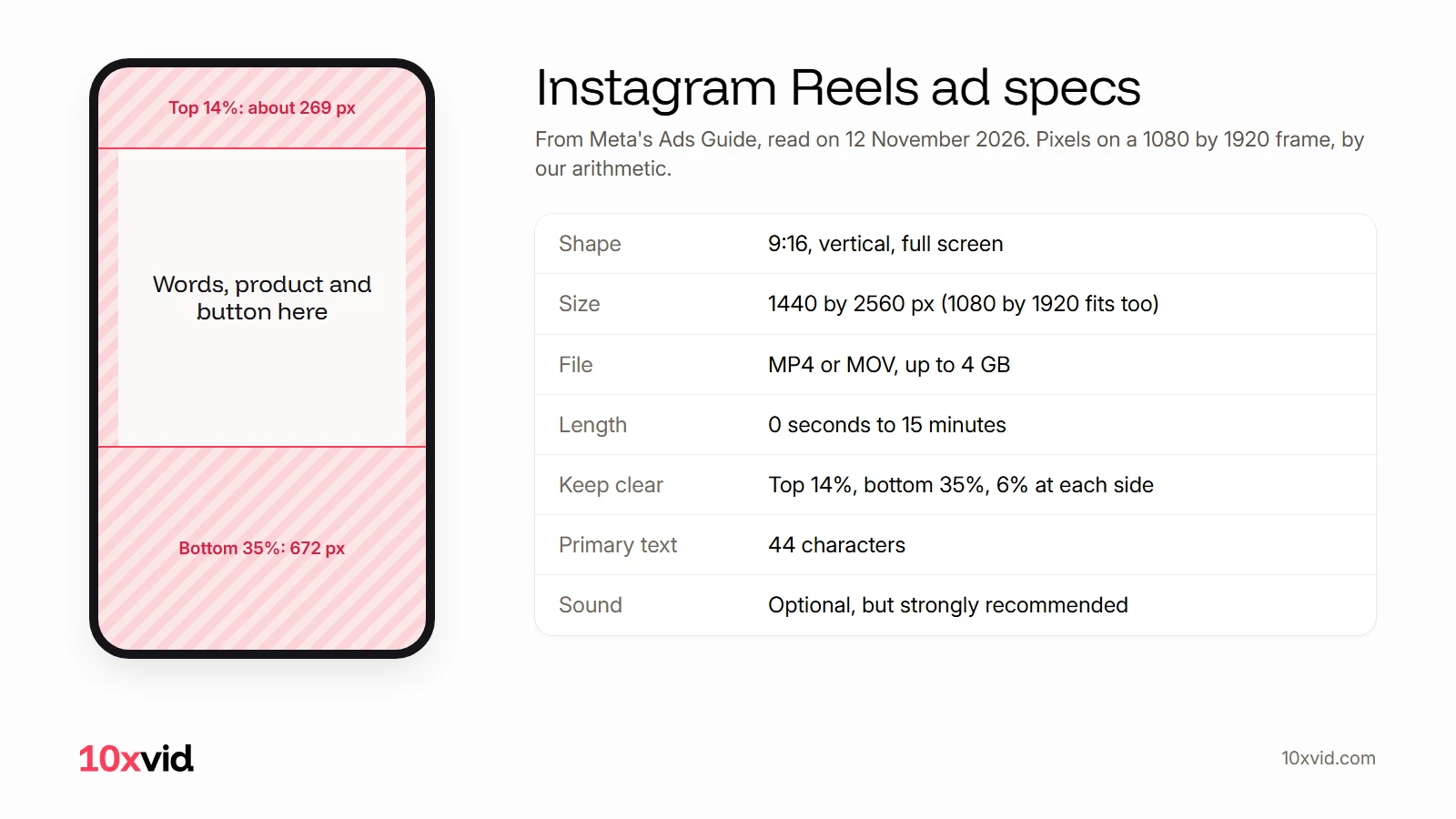
An Instagram Reels ad should be a vertical 9:16 video, 1440 by 2560 pixels, an MP4 or MOV of up to 4 GB. It can run from 0 seconds to 15 minutes. Keep the top 14%, the bottom 35% and 6% at each side free of words and logos, because Instagram covers them.
 Instagram Reels ad specs
In short
- Size and file: 9:16 at 1440 by 2560 pixels, MP4 or MOV, up to 4 GB, from 0 seconds to 15 minutes.1
- What Instagram covers: the top 14%, the bottom 35% and 6% at each side. Put your words, your product and your button in the middle.1
- What makes it work: the point in the first 3 seconds, sound on, and words in the safe zone. 10xvid makes the vertical ad from your app's link.23
Every figure here is from Meta's own pages, read on 12 November 2026. Some of the guides that rank for this search still give older numbers, and they are pointed out below.
What are the Instagram Reels ad specs?
These are Meta's specs for a video ad in the Instagram Reels placement:1
| Spec | Meta's figure |
|---|---|
| Shape | 9:16, vertical, full screen |
| Resolution | 1440 by 2560 pixels |
| Minimum width | 250 pixels for ads under 30 seconds, 500 pixels for 30 seconds or longer |
| File types | MP4, MOV |
| File size | Up to 4 GB |
| Length | 0 seconds to 15 minutes |
| Video settings | H.264, square pixels, fixed frame rate, progressive scan, stereo AAC audio at 128 kbps or more |
| Sound | "Optional, but strongly recommended" |
| Captions | "Optional, but recommended" |
| Primary text | 44 characters |
1080 by 1920 is also 9:16 and well above the minimum width, so a video exported at that size fits. Meta's recommended size is the larger one.1
Meta also lists what a Reels ad must not contain: licensed music, "Media that has a face or camera effect", a GIF, product tags, and reels published before 15 October 2021.1
Are Facebook Reels ad specs the same?
Almost. Meta keeps a separate page for Facebook Reels, and four things differ:4
| Spec | Instagram Reels | Facebook Reels |
|---|---|---|
| File types | MP4, MOV | MP4, MOV, GIF |
| Length | 0 seconds to 15 minutes | "No maximum limit." |
| Text | Primary text, 44 characters | Primary text, 40 characters, and a headline of 55 |
| Captions | "Optional, but recommended" | "Support for auto captioning: No" |
The shape, the 1440 by 2560 resolution, the 4 GB limit and the safe zone are the same on both. One 9:16 video covers both placements.14
How long should a Reels ad be?
Meta sets only a range: "0 seconds to 15 minutes".1 None of the Meta pages we read recommends a length for Reels ads.
Some guides still say otherwise. Hootsuite's says Reels ads "are between 15 and 30 seconds in length" and warns of "the 30 second limit".5 Meta's own guide, read the same day, allows up to 15 minutes.1
What Meta does set is when the point must land: "Follow the "3 second rule": Videos should capture attention and include key messaging or branding within the first 3 seconds."2 Short ads make that easy. For a first test, 15 to 30 seconds gives you the hook, one benefit shown in the app, and the ask.
What does Instagram cover on a Reels ad?
The top, the bottom and the sides. Meta's advice: "Consider leaving at least 14% of the top, 35% of the bottom, and 6% on each side of your asset free from text, logos, or other important creative elements."1
The reason is in the same line: so key parts are not "covered by the profile icon or call-to-action", or cropped on phones taller than 9:16.1 On those phones, Meta says it may zoom the ad to fill the screen, "which can crop areas outside the safe zone".6
In pixels, by our arithmetic (Meta gives only percentages):
| Frame | Top 14% | Bottom 35% | Each side 6% |
|---|---|---|---|
| 1440 by 2560 | about 358 px | 896 px | about 86 px |
| 1080 by 1920 | about 269 px | 672 px | about 65 px |
Two more rules from Meta's help page. With a disclaimer on the ad, keep "the bottom 40% of your ad free from text, logos and other key creative elements". And in Ads Manager you can turn on the "Safe zone guardrail": the safe zone is "the area inside the yellow overlay".6
What should a Reels ad do in its first seconds?
Hook, then show. Meta's creative guidance for Reels comes down to four things:
- The point in 3 seconds. "Videos should capture attention and include key messaging or branding within the first 3 seconds."2
- Sound on. "Over 75% of Reels views on Instagram are sound on."3 Reels "default to sound-on", so a voice or music is heard unless the viewer muted it.7
- Full screen and vertical. "Reels is a full screen environment", so a square video with bars wastes it.3
- Few words, large. "Use a modern, clean font in a large enough type size and a contrasting hue", and "Don't communicate too many messages because ads usually only have one call to action."6
Meta reports what these add up to. In its tests, Reels ads "built in 9:16 video, with audio and with key creative elements in the safe zone had 34.5% lower cost per result than image ads on Reels ads".7
For the music, use your own audio or royalty-free tracks. Meta's help page says Reels ads "cannot use licensed music" and points to its Sound Collection instead.8
How do you make a Reels ad for your app?
Plan it as a 9:16 film from the first frame.
- Start from your app. Use your real screens, your words and your logo, so the ad shows what people will get.
- Write the first 3 seconds first. One line a stranger understands, with the product on screen.
- Show one thing. One benefit, shown in the app, beats a list of features.
- Keep everything in the middle. Words, logo and button out of the top 14%, the bottom 35% and the sides.1
- Add sound. A voice or music, original or royalty-free.8
- Export 9:16. 1440 by 2560, or 1080 by 1920, as MP4 or MOV.1
- Check it on a phone with the caption and buttons over it, before you spend.
With 10xvid, steps 1 to 6 are one ask: paste your app's link, choose 9:16, and say what the ad should say. It reads your site and builds the ad from your real screens, words, colours and logo.
What happened when we made one?
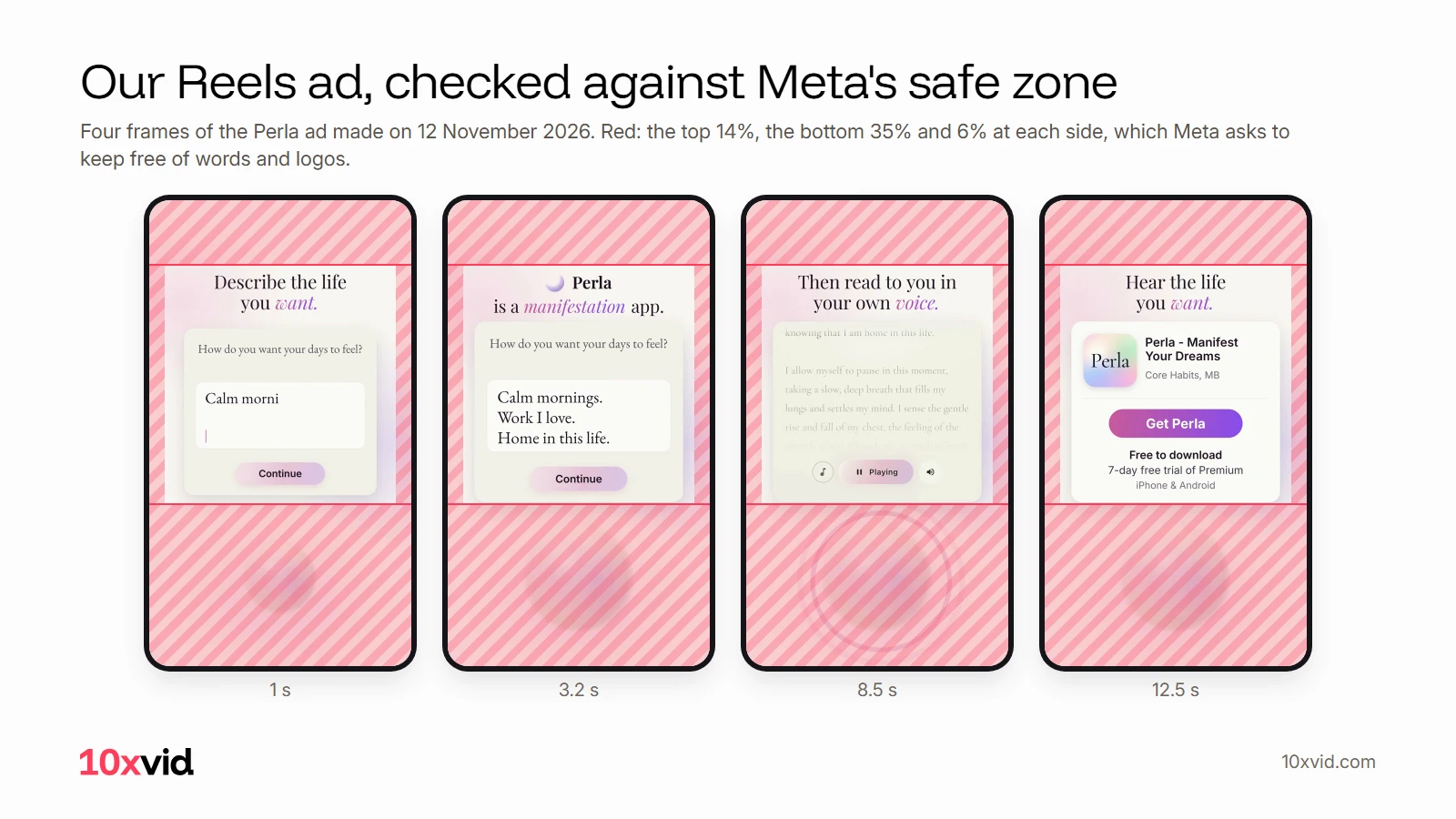
We made the ad at the top for Perla, a manifestation app of ours, with one command of the 10xvid command line tool: 10xvid make https://mperla.com with --aspect 9:16, --length 15, --engine flash and --goal installs. Its notes asked for a Reels ad with the hook in the first second, Perla named by second 3, and Meta's safe zone in plain words:
Keep every word, the logo and the button inside the middle of the frame: nothing in the top 14%, the bottom 35% or 6% at each side.
10xvid read Perla's site and made the ad on Motion V1 Flash in 17 minutes, the reading included.9 It runs 13.5 seconds (we asked for 15), at 1080 by 1920.
It opens on "Describe the life you want." and types an answer into the app's question card. By second 3 it says "Perla is a manifestation app." Then the answers become a written story, the story is read aloud, and it ends on the app's card: Get Perla, free to download, a 7-day free trial of Premium, iPhone and Android. Every claim in it is on Perla's site.10
Then we checked it against Meta's safe zone, frame by frame (the picture above). Every word, the app card and the button sit in the clear middle. Only a soft circle under them runs into the bottom band, and it carries no words. The headline starts right at the top band's edge, so it is worth a look in Ads Manager's safe zone guardrail before you publish.
We would ask for one change: the story's text is small and faint, so on a phone it reads as texture more than words. That is one more sentence to 10xvid, and the next version keeps everything else.
How do you run a Reels ad in Ads Manager?
Meta's help page gives the steps:8
- In Meta Ads Manager, click + Create campaign.
- Pick the objective that fits: Awareness, Traffic, Engagement, Leads, App promotion or Sales. For an app, App promotion asks for installs.
- Set the budget, the schedule and the audience.
- Placements: "when Advantage+ placements is automatically on, we'll include Reels ads in your campaigns." To choose by hand, click Show more settings and tick Instagram Reels.
- Add the ad's identity, destination and creative, preview it, and publish.
Meta reviews the ad before it runs. Once approved, it can appear in the Reels tab, between other reels.8
Where 10xvid fits
10xvid, motion graphics ads for apps, makes the vertical film this guide describes: from your app's link, with your real screens, words, colours and logo, in 9:16 for Reels and TikTok, and 1:1 and 16:9 for the feeds. Ask for changes in the chat, or make the next version from an ad that works.
Plans start at $9 a month: make your first Reels ad.
Questions about Instagram Reels ads
What size is an Instagram Reels ad?
9:16, at 1440 by 2560 pixels. The minimum width is 250 pixels for ads under 30 seconds and 500 pixels for longer ones.1
Can a Reels ad be longer than 30 seconds?
Yes. Meta's guide allows 0 seconds to 15 minutes for Instagram Reels, and no maximum on Facebook Reels.14
Can I use a popular song in a Reels ad?
Only if it is original or royalty-free, such as the tracks in Meta's Sound Collection. Reels ads "cannot use licensed music."8
Do Reels ads play with sound?
Yes, unless the viewer turned the sound off: "Reels default to sound-on."7
Is the safe zone the same for Stories?
Yes for 9:16 ads. Meta's help page groups Stories, Reels, Feed and Facebook in-stream reels under the same rule.6 The specs for TikTok are in our TikTok ad specs guide.
- Meta Ads Guide, Instagram Reels video (facebook.com/business/ads-guide/update/video/instagram-reels), read on 12 November 2026. ↩
- Meta for Business, tailored campaigns (facebook.com/business/ads/automation/tailored-campaigns), read on 12 November 2026. ↩
- Meta for Developers blog, a post on Reels ads (developers.facebook.com/blog, 7 November 2024), read on 12 November 2026. ↩
- Meta Ads Guide, Facebook Reels video (facebook.com/business/ads-guide/update/video/facebook-facebook-reels), read on 12 November 2026. ↩
- Hootsuite, Everything You Need to Know About Instagram Reels Ads (blog.hootsuite.com/instagram-reels-ads), read on 12 November 2026. ↩
- Meta Business Help Center, About text overlays and the safe zone for ads on Facebook and Instagram (facebook.com/business/help/980593475366490), read on 12 November 2026. ↩
- Meta for Business, Facebook and Instagram Reels ads (facebook.com/business/ads/facebook-instagram-reels-ads), read on 12 November 2026. ↩
- Instagram Help Center, Create Instagram Reels ads in Meta Ads Manager (facebook.com/help/instagram/546362593027755), read on 12 November 2026. ↩
- Our run: the 10xvid command line tool, video MWDGRUFB6362F5 in the format perla-mwdgrqju, 11:28 to 11:45 UTC, 12 November 2026. ↩
- mperla.com, read on 12 November 2026: "Free to download · iPhone & Android · 7-day free trial of Premium", and audio "narrated in a calm voice or recorded in your own voice". ↩