How to make a Google Play promo video for your app
A Google Play promo video is a YouTube video you link in Play Console. It must be public or unlisted, with ads turned off, not age-restricted, and embeddable. It plays before your screenshots, often muted, and only its first 30 seconds play on their own. Show the app in use within the first 10 seconds.
 Google Play promo video
In short
- What it is: one YouTube link in your store listing, shown before the screenshots, with a play button over your feature graphic.1
- What it must be: public or unlisted, ads off, not age-restricted, embeddable. Landscape or portrait both work.1
- What makes it work: the real app within 10 seconds, words for a muted viewer, and none of the words Google keeps off store graphics. 10xvid makes it from your app's link.1
Every rule here is from Google's own Play Console Help pages, read on 13 November 2026. The guides that rank for this search repeat a few rules Google's current pages do not say; they are pointed out below.
What is a Google Play promo video?
It is the video at the top of your store listing. Google's words: "You can add one preview video to your store listing by entering a YouTube URL in the "preview video" field."1
On the listing, "Your preview video is displayed before your screenshots", and people play it "by tapping on the play button that overlays on your feature graphic". It "may also be displayed on both home and search page".1
It can also play by itself: it "may autoplay inline with muted audio up to 30 seconds depending on the user device, setting, network connection, and surface area".1 So the first 30 seconds have to work with the sound off.
A promo video is optional for apps. Google says "It is not required, but we highly recommend providing a preview video for games particularly."1
What are Google's rules for the video?
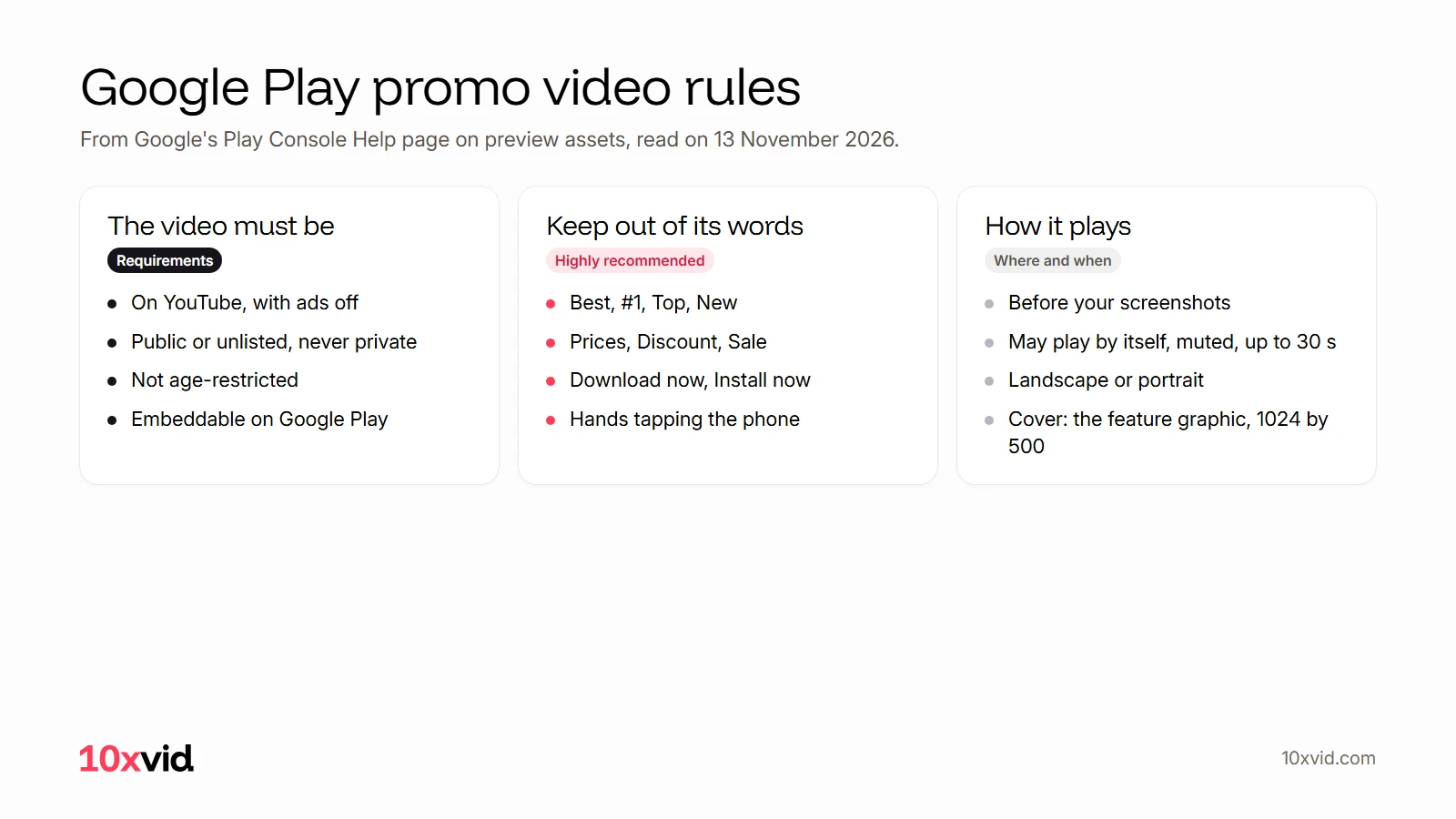
Google's page sorts its rules in two kinds. Requirements are mandatory: "failure to meet requirements may result in removal or suspension from Google Play". The rest are highly recommended, and breaking them "may result in changes to how your preview assets appear on Google Play or limit promotional opportunities".1 The words to keep out apply to any text you put in the video.
| Rule | Kind | Google's words |
|---|---|---|
| Ads off | Requirement | "Disable ads for your video to be shown on Google Play." |
| Public or unlisted | Requirement | "Do not set it to private." |
| No age restriction | Requirement | "Do not use an age-restricted video." |
| Embeddable | Requirement | "Make sure that your video is embeddable on Google Play." |
| One video's link | How to add it | "not a YouTube playlist or channel URL" |
| No timecodes | How to add it | "Do not add extra parameters like timecodes in the YouTube URL." |
| No ranking, price or offers | Highly recommended | Words such as Best, #1, Top, New, Discount, Sale or Million Downloads stay out |
| No calls to install | Highly recommended | Phrases such as Download now, Install now, Play now or Try now stay out |
| No hands on the phone | Highly recommended | "Do not include people interacting with the device" |
Two notes on ads. Turning off monetization is the way Google names to turn them off, and it warns: "If your video uses copyrighted content, turning off monetization for your video may not be enough to prevent ads."1 And Google's metadata policy, which covers the whole listing, asks for "screenshots and videos that reflect your app's actual experience."2
How long should a Google Play promo video be?
Google's current page gives no number of seconds. What it says is: "Keep your videos short and concise because only the first 30 seconds autoplays."1
Some guides that rank for this search say more. Apptamin's writes: "Google recommends to keep the promotional video you use on the Play Store between 30 seconds and 2 minutes."3 AppRadar's lists "Min 30 sec max 2 min".4 Neither range is on Google's preview asset page, read the same day.1
A sensible plan is to put everything that matters in the first 30 seconds, because that is what plays on its own.
Should it be landscape or portrait?
Either. "Create a video in either landscape or portrait, both orientations are supported on the store listing page."1 Google asks you to "Choose a video orientation that best matches the app experience" and not to "leave black bars on either side of a portrait video."1
Portrait has numbers behind it. In October 2024 Google wrote that "Portrait videos on your store listing now have a full-screen experience", and that "portrait videos drive +7% increase in total watch time, a +9% increase in video completion count, and a +5% increase in conversions."5
Older guides still say landscape only. AppRadar's: "Upload on YouTube first, which means the videos should be landscape".4 That was the rule once; it is not on Google's current page.
What does the feature graphic have to do with it?
It is the video's cover. Google: "You must provide a feature graphic to publish your store listing", and it is used "As a cover image for your preview video, if present."1
It is a JPEG or 24-bit PNG with no alpha, 1024 by 500 pixels.1 The same words are kept off it as off the video, plus one more: Free. Its list is Best, #1, Top, New, Free, Discount, Sale and Million Downloads.1
Design the two together: when the video does not play by itself, "a play button is overlaid on your feature graphic."1
What makes a promo video work?
Google's own guidance on the preview asset page comes down to five things:1
- The app in the first 10 seconds. "Show the actual in-app or in-game experience, focusing on the core features and content as early as possible within the first 10 seconds of the video."
- Mostly the app. "Aim for at least 80% of the video to be representative of the user experience."
- Few title cards. "Limit title screens, logos, cutscenes, or other pre-rendered or promotional content."
- Words for a muted viewer. "Consider using copy to give the user context if the video is muted (for example, when autoplayed)." Make the text readable, "displaying the text long enough for the user to read it."
- Something new. "Avoid duplication and redundancy of messaging across your short description, screenshots, feature graphics, or developer video."
It does not have to be expensive: "Your video does not need to be professionally made", Google writes, though it asks for smooth pacing, effects, music, transitions and text.1
What is the difference between a promo video and an ad?
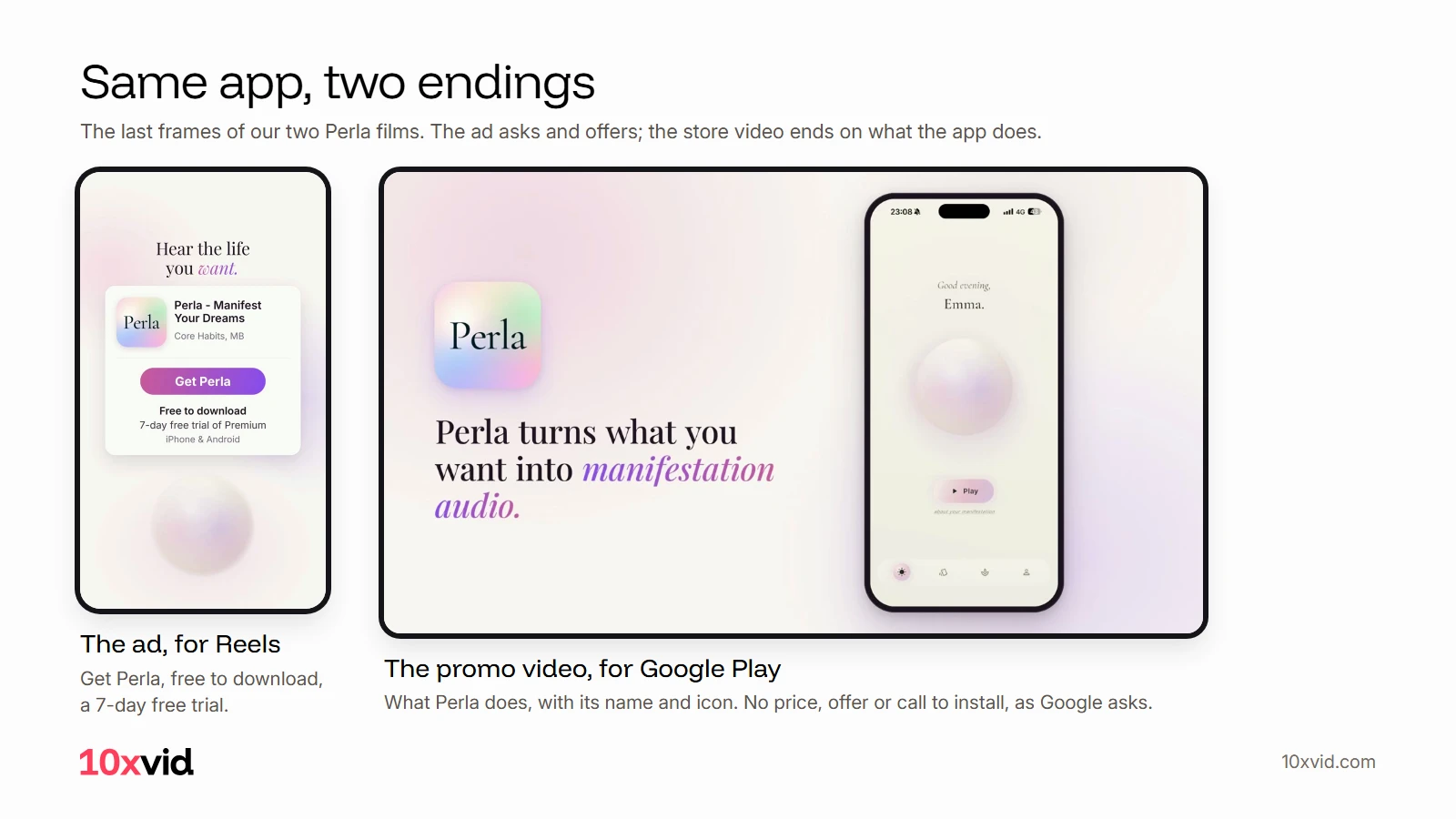
The ending. An ad ends on an ask and often an offer. A promo video should end on the app.
We made both for Perla, a manifestation app of ours. Yesterday's Reels ad ends on "Get Perla", "Free to download" and a 7-day free trial: right for an ad, and against Google's guidance for a promo video, which keeps price, offers and calls to install off the store's video. Today's promo video ends on what Perla does.
Make them as two films from the same app. With 10xvid that is two asks in the same project: one for the ad, one for the store.
How do you make a Google Play promo video for your app?
- Pick the orientation. Portrait if your app is used upright on a phone, landscape for a tablet or TV app, or a game played sideways.15
- Open on the app. The first 10 seconds show the app doing its main job.1
- Write for a muted viewer. Short lines on screen, held long enough to read.1
- Keep the store words out. No "Best", "#1", "Free", prices, offers or "Download now".1
- Make the feature graphic at 1024 by 500, as the video's cover.1
- Upload to YouTube as public or unlisted, with monetization off, not age-restricted, embeddable.1
- Paste the video's link in Play Console.
With 10xvid, steps 1 to 4 are one ask: paste your app's link, pick the shape, and say it is a store video. It reads your site and builds the film from your real screens, words, colours and logo.
What happened when we made one?
We made the video at the top for Perla with one command of the 10xvid command line tool: 10xvid make --format perla-mwdgrqju with --aspect 16:9, --length 30 and --engine flash. It used the Perla project we had made the day before for the Reels ad, so Perla's site was not read again. The notes called it a store video and kept Google's words out:
Store rules: no prices, no 'free', no rankings or awards, no 'download now' or other call to install, no time-limited offers. End on the Perla name and what it does.
It took 20 minutes on Motion V1 Flash and runs 24.5 seconds (we asked for 30), at 1920 by 1080.6
It opens on the app's own question screen, how you want your days to feel, beside the line "Start with the life you want." Perla is named as the manifestation app by second 3. Then come the written story, the voice reading it, the daily affirmations and the guided breathing. It ends on the app's icon and "Perla turns what you want into manifestation audio." Every line is on Perla's own site.7
Against Google's guidance: the app is on screen from the first second and in nearly every frame, and there is no price, offer, ranking or call to install. One word is worth a second look: one of the app's own answers is Free, as in free to feel. It is the app's screen, not an offer, and it stays off the feature graphic, where Google names the word.
We would change two things. We chose landscape before reading Google's portrait numbers; Perla is used upright on a phone, so for its listing we would ask for the same film in 9:16. And in the first seconds the phone runs past the top and bottom of the frame; the next version would keep it whole. Each is one sentence to 10xvid.
How do you add the video in Play Console?
Google: "You can upload images and add a preview video in the “Graphics” section", on the Main store listing page of Play Console.1
- Upload the video to YouTube, as public or unlisted, with monetization off.
- In Play Console, go to Grow users, Store presence, Main store listing.
- In Graphics, paste the video's YouTube link in the preview video field. Use the video's own link, with no timecode.
- Check the feature graphic, then save.
Make a localized video for each market where your listing is translated, as Google recommends: "Provide a localized video tailored for users in different markets around the world."1
Where 10xvid fits
10xvid, motion graphics ads for apps, makes the store film and the ad from the same project: from your app's link, with your real screens, words, colours and logo, in 9:16, 1:1 or 16:9. Ask for changes in the chat, and keep each film to its own rules.
Plans start at $9 a month: make your first video. For Apple's side, see our App Store preview video guide.
Questions about Google Play promo videos
Is a promo video required on Google Play?
No, for apps it is optional. Google highly recommends one, "for games particularly", and some places on Google Play show a game only with one.1
Can the promo video be unlisted on YouTube?
Yes. Google asks for public or unlisted, never private.1
Does the promo video play with sound?
Not on its own. It can autoplay "with muted audio up to 30 seconds"; people who tap it hear it.1
Can I test two promo videos against each other?
Not with Google's store listing experiments. Its help page lists the app icon, the feature graphic, the screenshots and the descriptions as what you can test, and up to two variants.8
Can my promo video say "free"?
Google's lists keep price and offers off the store's graphics, and Free is named in the feature graphic's list. Its metadata policy counts "Images or text that indicate price and promotional information" against the listing.12 Say what the app does instead.
- Google Play Console Help, Add preview assets to showcase your app (support.google.com/googleplay/android-developer/answer/9866151), read on 13 November 2026. ↩
- Google Play Console Help, Metadata policy (support.google.com/googleplay/android-developer/answer/9898842), read on 13 November 2026. ↩
- Apptamin, Promo video: the full guide to video on the Google Play Store (apptamin.com/promo-video/guide-promo-videos-play-store), read on 13 November 2026. ↩
- AppRadar, App Promo Video: How to Create a Great Promo Video for Google Play (appradar.com/academy/promo-video), read on 13 November 2026. ↩
- Android Developers Blog, What's new in Google Play, 31 October 2024 (android-developers.googleblog.com/2024/10), read on 13 November 2026. ↩
- Our run: the 10xvid command line tool, video MWEV8XST3BFA7A in the format perla-mwdgrqju, 11:01 to 11:21 UTC, 13 November 2026. ↩
- mperla.com and mperla.com/affirmations, read on 13 November 2026: the life "written from your own answers and narrated in a calm voice or your own", "affirmations and breathwork", and "Daily affirmations that match your goals". ↩
- Google Play Console Help, store listing experiments (support.google.com/googleplay/android-developer/answer/12053285), read on 13 November 2026. ↩