How to make video ads for your app with Claude Code
Claude Code can make videos in two ways: it writes code that renders one, or it runs a tool that makes one. For finished video ads for your app, connect 10xvid with one prompt, then ask for the ads in plain words.
 Video ads from Claude Code
In short
- Claude Code does not draw video itself. It writes code that renders one, or it runs a command or a tool that returns the file.
- Coding a video yourself gives you full control, and leaves the render, the sound, the shapes and the ad's structure to you.
- 10xvid connects to Claude Code with one prompt, and to Cursor, Codex and OpenCode the same way. Then one sentence gets you finished ads in 9:16, 1:1 or 16:9.
Can Claude Code make videos?
Yes, by writing code or by running a tool. Anthropic describes Claude Code as "an agentic coding tool that reads your codebase, edits files, runs commands, and integrates with your development tools."1 Video comes from the last two parts: the commands it runs and the tools it connects to.
The route most guides show is Remotion, a library for making videos in code. Its own docs give the steps:2
- Create a project:
npx create-video --yes --blank my-video - Add Remotion's skills for coding agents:
npx remotion skills add - Preview it:
npm run dev, then ask Claude Code for the scenes you want. - Render the file:
npx remotion render3
That gets you an animation you wrote by prompting. An ad needs more. It needs a hook in the first second, your real screens, a voice or music, captions, and a tall and a square version. With the code route, each of those is another round of prompts.
Should you code the video or call a tool?
Code it when the video is the product: a custom explainer, a data story, a one-off launch film you want to shape frame by frame. Call a tool when you need ads, often, in several shapes, and want each one finished.
| Compare | Code it with Remotion | Call 10xvid |
|---|---|---|
| What you write | A prompt for every scene, then fixes | One sentence, or one command |
| What comes back | A project you preview and render | A finished MP4 per shape |
| Sound | Yours to add | Music, and a voiceover if you ask |
| Shapes | One per render, set up by you | 9:16, 1:1 and 16:9 in one ask |
| Your app's screens | Yours to supply and place | Read from your site, or uploaded |
| Time per video | Yours, prompt by prompt | About 5 to 15 minutes on Motion V1 Flash |
Both run from the same Claude Code session, so you can do both.
What do you need to make video ads with Claude Code?
Three things:
- Claude Code or another coding agent. Remotion's docs note that "Most coding agents require a paid subscription."2
- Node.js 18 or newer, for the 10xvid command line tool.4
- A 10xvid account. Plans are paid by the month.
How do you connect Claude Code to 10xvid?
Paste one line into Claude Code:
Fetch and execute the appropriate instructions to set me up for 10xvid from https://10xvid.com/agent-setup/prompt.md
The same line is on the home of the app, as Onboard your agent to 10xvid. Claude Code then does three things itself:5
- Installs the 10xvid CLI, the command line tool:
npm install -g https://10xvid.com/cli/10xvid.tgz - Signs it in. It shows you a link and a code. You open the link, check that the code matches, and press Connect. That is the one step that is yours.
- Connects itself.
10xvid setup claudeadds 10xvid's MCP server for every project, and a skill that teaches Claude Code the commands.
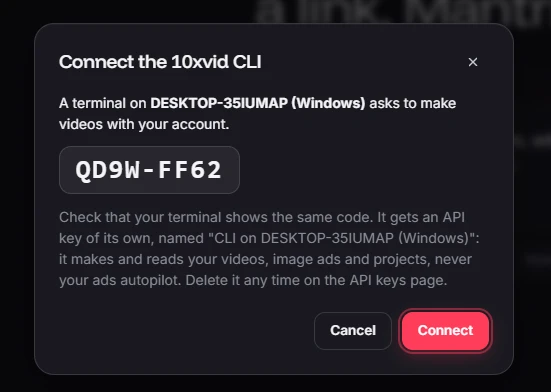
MCP, the Model Context Protocol, is "an open-source standard for connecting AI applications to external systems."6 It lets Claude Code call 10xvid's tools directly. You can add the server by hand too, with a key from the app's API keys page:
claude mcp add --transport http 10xvid https://10xvid.com/mcp --header "Authorization: Bearer YOUR_API_KEY"
Claude Code's docs explain the scopes: "local (default): available only to you in the current project", and "user: available to you across all projects".7
How do you set it up in Cursor, Codex or OpenCode?
The same prompt works in each. The setup command it runs depends on the agent:5
| Agent | Command it runs | What it adds |
|---|---|---|
| Claude Code | 10xvid setup claude | The MCP server for every project, and a skill |
| Cursor | 10xvid setup cursor | The MCP server in Cursor's settings |
| VS Code with GitHub Copilot | 10xvid setup vscode | The MCP server |
| Windsurf | 10xvid setup windsurf | The MCP server |
| OpenCode | 10xvid setup opencode | The MCP server, and a short guide in AGENTS.md |
| Codex | 10xvid setup codex | A short guide in AGENTS.md: the CLI is all it needs |
Cursor keeps servers "available everywhere" in ~/.cursor/mcp.json.8 Codex stores its servers in ~/.codex/config.toml,9 but it runs shell commands, so the CLI alone does the job.
What do you say to get a good ad?
Say what a good brief says: the link, the shape, the length, and the one thing the ad must get across. For example:
Make 3 vertical ads for
https://your-app.com, 15 seconds each. Lead with the free plan. Never mention price.
Claude Code turns that into a command or a tool call. With the CLI, each part has a flag:4
--aspect 9:16,1:1: tall, square or wide, several at once.--length 15: 5 to 30 seconds.--notes "...": what the ad should say, show or avoid, in your words.--must-say,--must-avoid,--angle,--audience,--goal: the brief of a new project.--count 3: up to six ads from one reading of your site.--engine flashor--engine motion: Motion V1 Flash, about 5 to 15 minutes a video, or Motion V1, half an hour or more.
What happened when we asked for one?
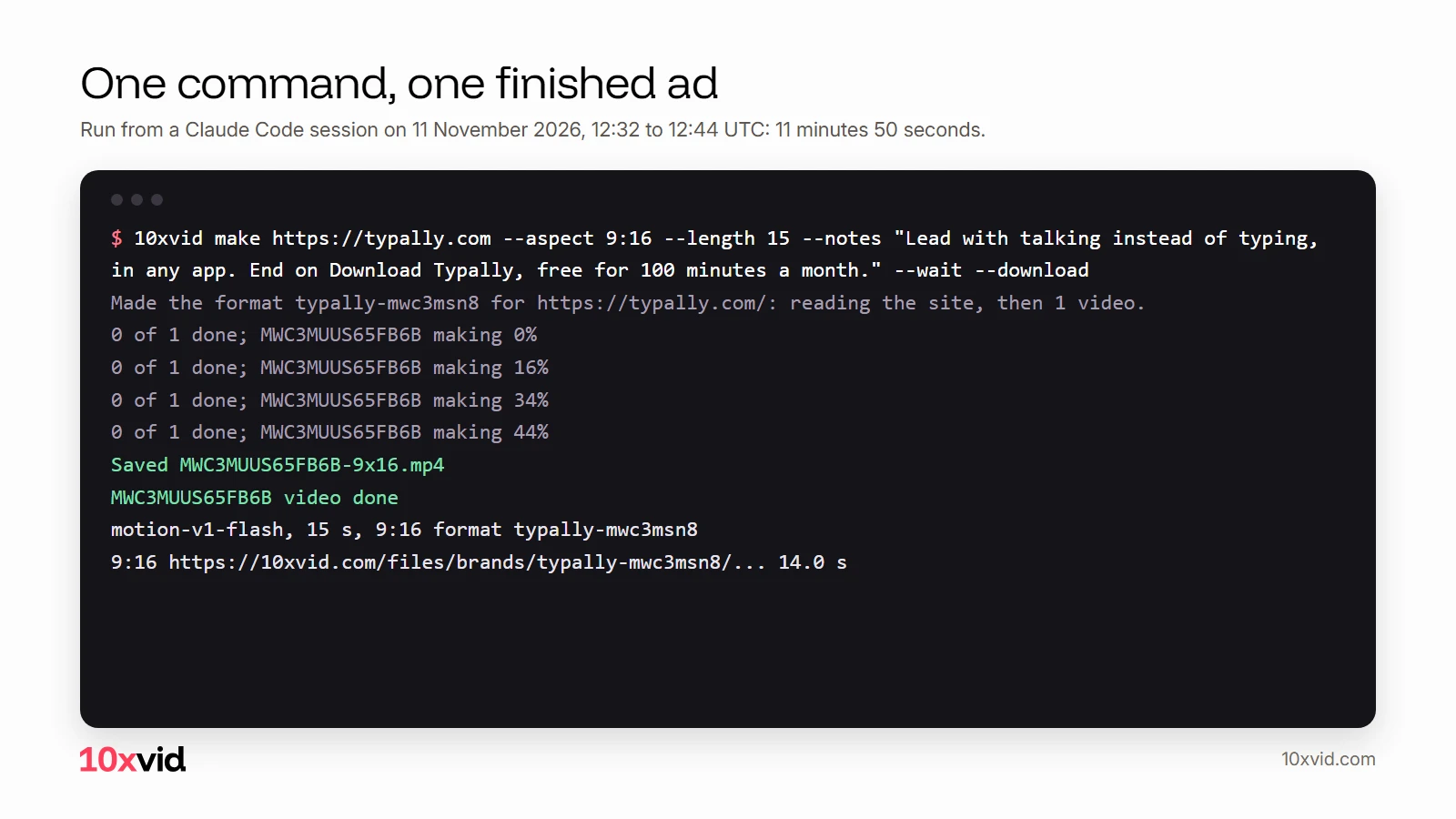
We made the ad at the top from a Claude Code session: the one that wrote this article. It ran one command for Typally, a voice typing app of ours. The site was read, the ad was made on Motion V1 Flash and saved to the folder in 11 minutes 50 seconds.10
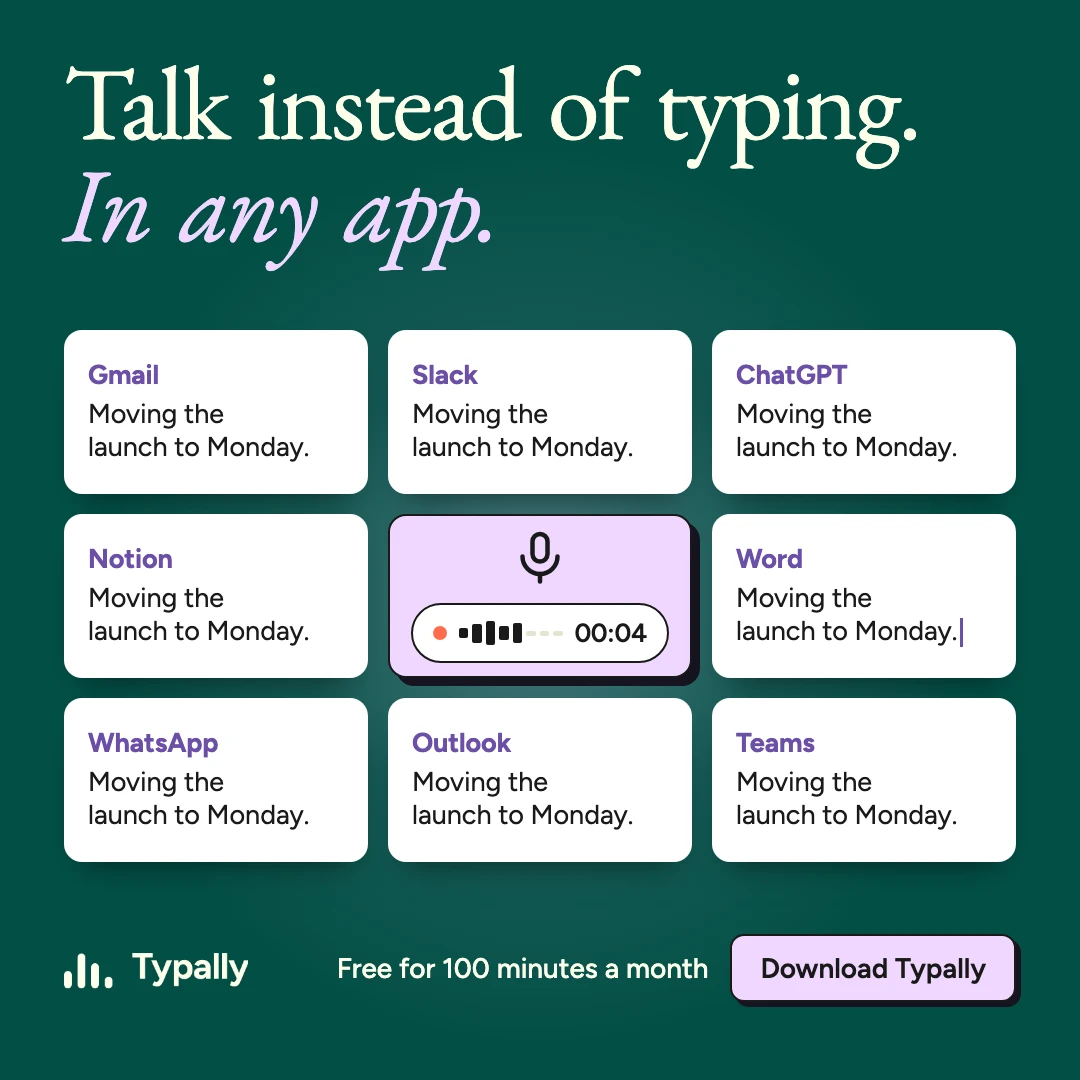
The ad runs 14 seconds (we asked for 15) in Typally's own look. It opens on "Talk instead of typing." and types a Slack message by voice. Then "Hold one key and talk in any app.", a count up to 308 apps, and "Download Typally, free for 100 minutes a month." Every claim in it is on Typally's site.11
We would ask for one change: the lower half stays empty, so the product could sit bigger. That is one more sentence to Claude Code, or 10xvid version MWC3MUUS65FB6B --notes "..." by hand.4
One more command made a square image ad from the same project, without reading the site again: 10xvid image --format typally-mwc3msn8 --count 1 --wait --download. It took 5 minutes 24 seconds.10
What else can the agent do with 10xvid?
More than make a first ad. The MCP server has these tools,12 and the CLI has a command for each:
| Ask | MCP tool | CLI command |
|---|---|---|
| Make videos from a link or a project | make_videos | 10xvid make |
| Check one video and get its files | get_video | 10xvid status <id> |
| List what you made | list_videos | 10xvid videos |
| See credits and prices | account | 10xvid account |
The CLI adds three more.4 10xvid image makes image ads. 10xvid version <id> --notes "..." makes a new version of a finished video. 10xvid upload adds your own screenshots, logo or footage.
What should you watch out for?
- A key of its own. The setup makes a key named after your computer.4 Delete it on the API keys page any time, without stopping anything else.12
- Commands need your yes. Claude Code asks before it runs a shell command, except a built-in set of read-only ones.13 Read what it wants to run.
- You pay as in the API. Each video is charged by the second in each shape, at its engine's price. Your plan's credits pay first, and "Nothing is charged for a video that could not be finished."12
10xvid accountshows what is left. - Links expire. A finished video's links work for seven days.12 Download what you keep.
- Making takes minutes. Reading a site takes a few minutes, then each video takes 5 to 15 minutes on Motion V1 Flash.12 Ask Claude Code to wait for it, or to check back.
Where 10xvid fits
10xvid, motion graphics ads for apps, gives your coding agent a tool that returns a finished ad. It reads your site, builds each ad from your real screens, words and logo, and makes it in the shapes you ask for. Everything it makes from the terminal is in the app too, where you can watch it and ask for changes.
Paste your link and make your first ad.
Questions about Claude Code and video ads
Can Claude Code make videos without 10xvid?
Yes. It can write a Remotion project and render it with npx remotion render.3 You prompt every scene, and add the sound and the other shapes yourself.
Does it work with Cursor or Codex?
Yes. The same one-line prompt sets up Cursor, Codex, OpenCode, Windsurf and VS Code with GitHub Copilot.5
Can it make image ads too?
Yes. Ask for image ads, or run 10xvid image <link>. They come out square by default.4
Can I run it without the agent?
Yes. The CLI works by itself in a terminal or a script. On a server, give it a key with TENX_API_KEY.4
- Anthropic, Claude Code overview (code.claude.com/docs/en/overview), read on 11 November 2026. ↩
- Remotion, Claude Code (remotion.dev/docs/ai/claude-code), read on 11 November 2026. ↩
- Remotion, Render your video (remotion.dev/docs/render), read on 11 November 2026. ↩
- 10xvid CLI 1.0.4,
10xvid make --help, and the CLI docs (10xvid.com/docs/cli), 11 November 2026. ↩ - 10xvid, the agent setup instructions (10xvid.com/agent-setup/prompt.md), 11 November 2026. ↩
- Model Context Protocol, What is MCP (modelcontextprotocol.io/docs/getting-started/intro), read on 11 November 2026. ↩
- Anthropic, Connect Claude Code to tools via MCP (code.claude.com/docs/en/mcp), read on 11 November 2026. ↩
- Cursor, Model Context Protocol (cursor.com/docs/mcp), read on 11 November 2026. ↩
- OpenAI, Model Context Protocol in Codex (developers.openai.com/codex/mcp), read on 11 November 2026. ↩
- Our run: 10xvid CLI 1.0.4, video MWC3MUUS65FB6B (12:32 to 12:44 UTC) and image ad MWC42YCS82A5CB (12:44 to 12:50 UTC) in the format typally-mwc3msn8, 11 November 2026. ↩
- typally.com, read on 11 November 2026: "All 308 apps", and 100 minutes a month free, no card. ↩
- 10xvid, MCP docs (10xvid.com/docs/api/mcp), 11 November 2026. ↩
- Anthropic, Claude Code permissions (code.claude.com/docs/en/permissions), read on 11 November 2026. ↩